← All guides

Pro: what it includes

3 min · Last checked: October 2026

OutLearn is free to use, with no ads. Everything you need to study is free. Pro adds extras. You can try the app for as long as you like before you decide anything.

How to read the pictures: the red frame shows what to tap, and its number is the number of the step.

Free, always

What Pro adds

  • Images on your cards.
  • Image Occlusion: hide parts of a picture to test yourself.
  • LaTeX: write maths and science formulas.
  • Live translations while you type a card.
  • Voice notes: record your own voice on a card.
  • Study insights: practise the cards you keep missing, and see how ready each deck is. (Study modes.)
  • PDF printing in every layout, including double-sided cards. (Print your cards.)
  • Colours and styles for the text on your cards.
  • Folders inside folders, and your own folder icons and colours. (Folders and decks.)
  • Custom app themes: change the colour of the whole app.
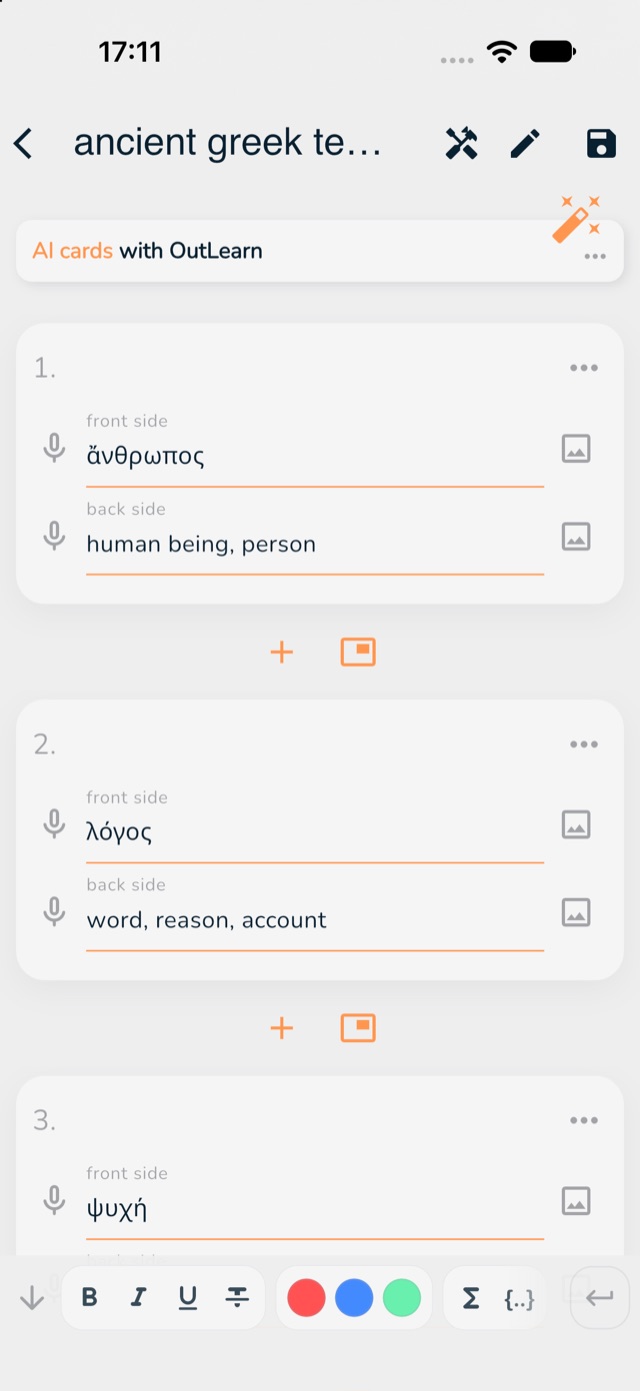
The card editor, with the microphone, the picture button, the colour dots and the formula buttons marked in red
Where some of them are when you write cards: the microphone (voice note), the picture button, the colour dots and the formula buttons.

How paying works

  • Pro is one payment. It is never a subscription, and nothing renews.
  • Pro belongs to your account, so it works on every device where you sign in.
  • The price is shown in your own money, and you always see it before you pay.
  1. To look at it, tap Get Pro, or the Pro button next to Version in Settings.
  2. The screen shows what each extra does, with a picture.
  3. You decide. You can close the screen and use the app as before.

Not sure?

Use OutLearn for a while first. If something does not work for you, or you have a question before you pay, email and I will answer you myself.