← All guides

Move your sets over from Quizlet

3 min · Last checked: October 2026

You can bring a Quizlet set into OutLearn without typing the cards again. You copy the set out of Quizlet, then paste it into OutLearn. It takes about three minutes for each set.

Importing is free. You do not need Pro. Coming from Anki instead? See Move your decks over from Anki.

How to read the pictures: the red frame shows what to tap, and its number is the number of the step.

Part 1: Copy your set out of Quizlet

Do this on a computer, in your web browser, on the Quizlet website. Quizlet's menus can change a little over time, so the words may look slightly different.

  1. Open the set you want to move.
  2. Click the three dots (...) near the top of the set and choose Export.
  3. Leave the two choices as they are: a tab between the term and the definition, and a new line between the cards.
  4. Click Copy text.

Part 2: Paste it into OutLearn

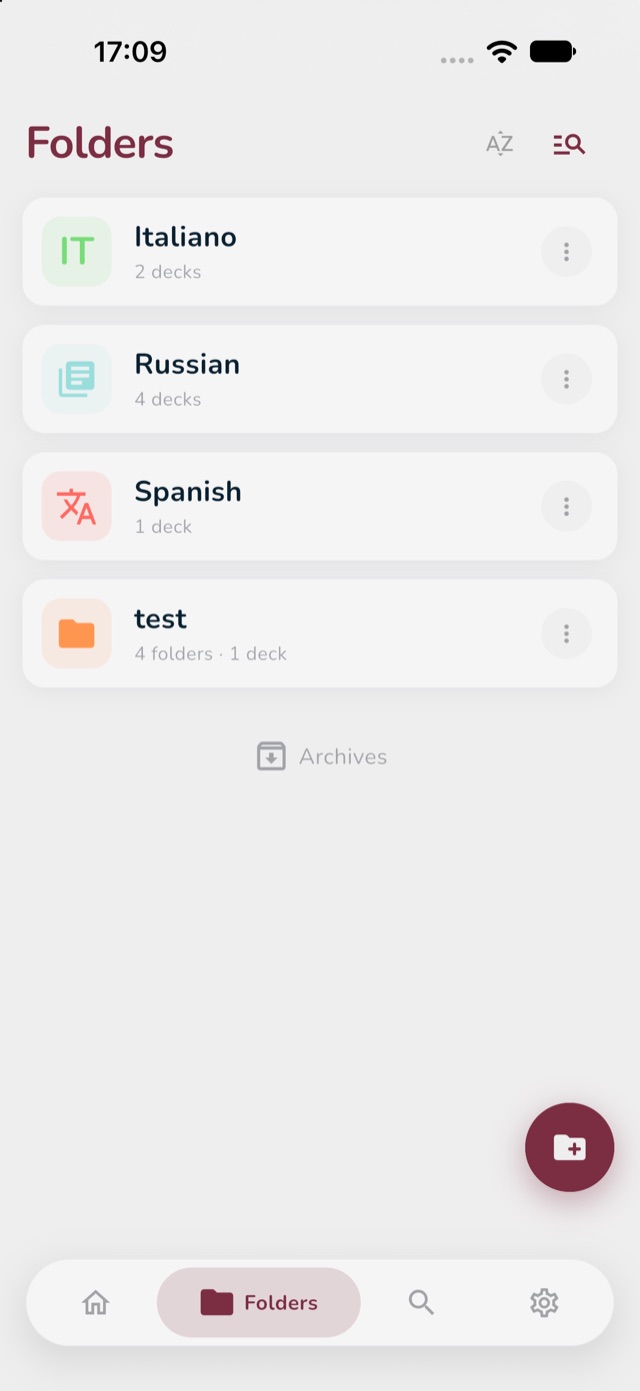
  1. Open OutLearn and tap the Folders icon at the bottom of the screen. (How folders work.)
  2. Tap the folder where you want your new deck. If you do not have one yet, see Start here to make a folder first.
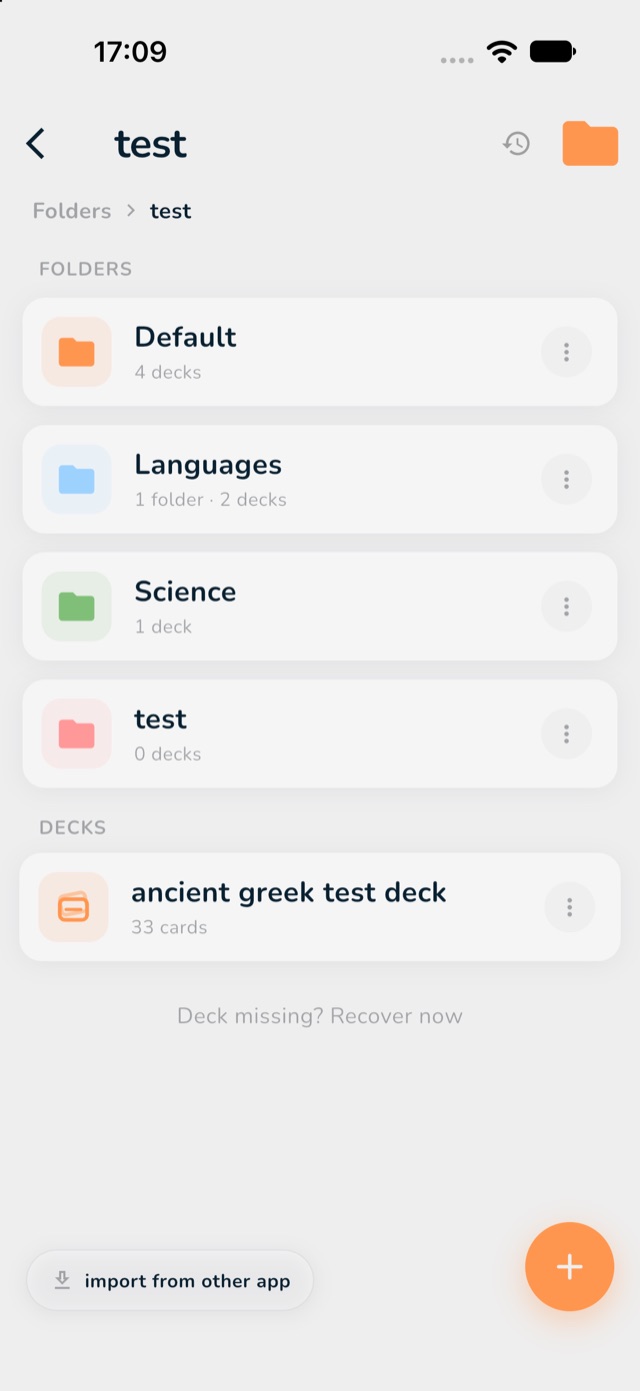
  3. Tap import from other app at the bottom left of the screen.
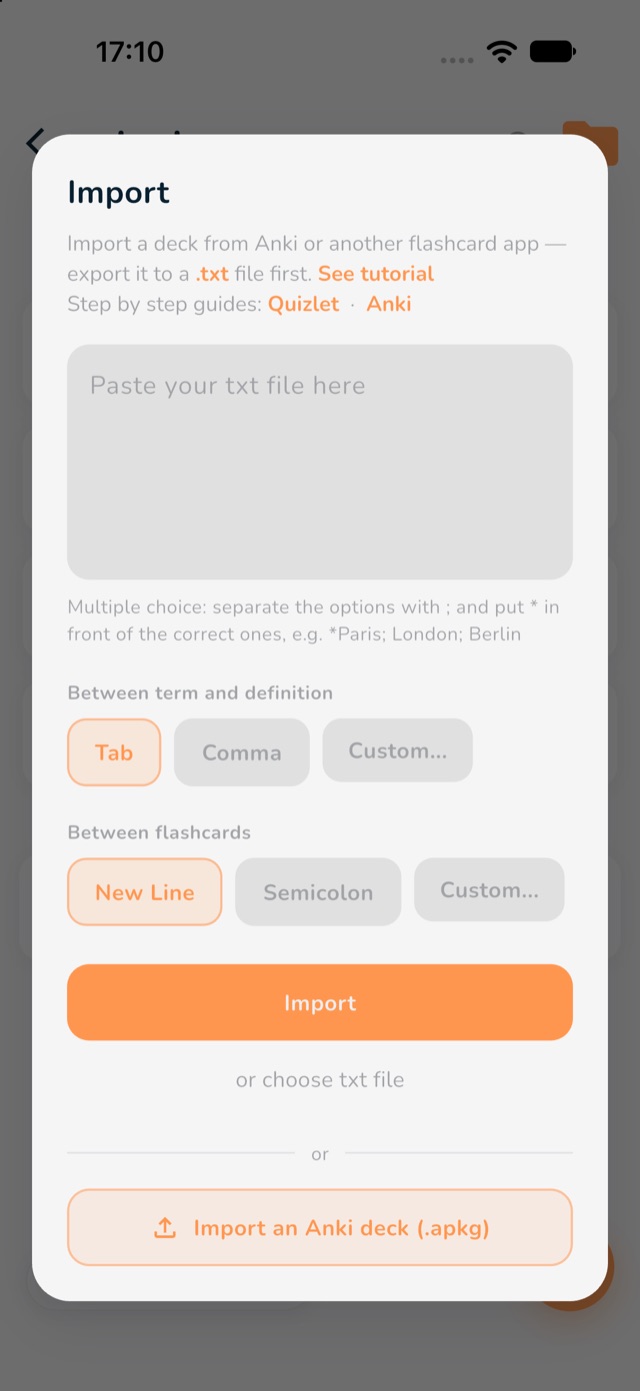
  4. Tap the big box that says "Paste your txt file here", hold your finger on it and choose Paste. Your cards appear in the box.
  5. Check the two choices under the box. Between term and definition should say Tab, and Between flashcards should say New Line. They are already chosen for you.
  6. Tap Import.
The Folders screen, with the Folders icon and a folder marked in red
1: the Folders icon. 2: your folder.
Inside a folder, with the import from other app button at the bottom left marked in red
3: import from other app.
The Import window, with the paste box, the Tab and New Line choices, and the Import button marked in red
4: the paste box. 5: Tab and New Line (already chosen). 6: Import.

Part 3: Study your cards

Your new deck is now in your folder. Tap its name to open it, then tap Binge Learn to start. The three study modes explains the three ways to study, and which one to pick.

If something looks wrong

  • All the text is on one card, or the cards are in the wrong place: go back, and check that you copied with the tab and new line choices in Quizlet. In OutLearn, choose Tab and New Line.
  • Nothing happens when you tap Import: make sure the box really has your cards in it.
  • Your set has pictures: the text comes across. Pictures from Quizlet do not come with the copy, so you can add them again to the cards that need them.
  • It still does not work: email and tell me what you see. A photo of your screen helps. I will help you myself.