AZ-900 - Module 2
Study these flashcardsFree · spaced repetition · iPhone, Android, Mac & web
All cards
1
A computing platform with an ever-expanding set of services to help you build solutions to meet your business goals
What is Microsoft Azure?
A computing platform with an ever-expanding set of services to help you build solutions to meet your business goals
2
In Azure Cloud Shell, what commands are usually Azure specific commands?
az xxxx
In Azure Cloud Shell, what commands are usually Azure specific commands?
az xxxx
3
What is the Azure CLI interactive mode?
A way to use Azure Cloud Shell in a way that resembles an IDE(autocompletion, command decriptions, and examples)
What is the Azure CLI interactive mode?
A way to use Azure Cloud Shell in a way that resembles an IDE(autocompletion, command decriptions, and examples)
4
Explain the 2 core architectural components of Azure
Physical infrastructure: Azure has datacenters around the world. The data centers are grouped into Azure Regions or Azure availability zones
Management infrastructure: This includes Azure resource and resource groups, subscriptions, and accounts
Explain the 2 core architectural components of Azure
Physical infrastructure: Azure has datacenters around the world. The data centers are grouped into Azure Regions or Azure availability zones
Management infrastructure: This includes Azure resource and resource groups, subscriptions, and accounts
5
What is an Azure Region?
A region is a geographical area on the planet that contains at least one, but potentially multiple datacenters that are nearby and networked together with a low-latency network.
What is an Azure Region?
A region is a geographical area on the planet that contains at least one, but potentially multiple datacenters that are nearby and networked together with a low-latency network.
6
What is an Azure Availability Zone?
Availability zones are physically separate datacenters within an Azure region. Each zone is made up of one or more datacenters equipped with independent power, cooling, etc. These are isolated, if one zone goes down, the other continues working.
What is an Azure Availability Zone?
Availability zones are physically separate datacenters within an Azure region. Each zone is made up of one or more datacenters equipped with independent power, cooling, etc. These are isolated, if one zone goes down, the other continues working.
7
What are availability zones primarily for?
VMs, managed disks, load balances, and SQL databases.
What are availability zones primarily for?
VMs, managed disks, load balances, and SQL databases.
8
What are Azure Region pairs?
An Azure region that is paired with another region within the same geography(e.g. US, Europe, Asia) This approach allows for the replication of resources across a geography.
What are Azure Region pairs?
An Azure region that is paired with another region within the same geography(e.g. US, Europe, Asia) This approach allows for the replication of resources across a geography.
9
What are Azure Sovereign Regions?
Instances of Azure that are isolated from the main instance of Azure. This could be due to compliance or legal purposes(eg. US DoD Central)
What are Azure Sovereign Regions?
Instances of Azure that are isolated from the main instance of Azure. This could be due to compliance or legal purposes(eg. US DoD Central)
10
What is an Azure Resource?
A basic building block of Azure. Anything that is created, provisioned, deployed, etc. is a resource. VMs, virtual networks, databases, cognitive services, etc.
What is an Azure Resource?
A basic building block of Azure. Anything that is created, provisioned, deployed, etc. is a resource. VMs, virtual networks, databases, cognitive services, etc.
11
What is a Azure Resource Group?
A grouping of resources. A single resource can only be in one resource group at a time. Resources can be moved between resource groups. Resource groups cannot be nested. When an action is applied to a resource group, that action will apply to all resources within the group.
What is a Azure Resource Group?
A grouping of resources. A single resource can only be in one resource group at a time. Resources can be moved between resource groups. Resource groups cannot be nested. When an action is applied to a resource group, that action will apply to all resources within the group.
12
Explain a Azure subscription
A unit of management, billing, and scale. Subscriptions allow you to organize your resource groups and facilite billing(e.g. PROD Subscription, TST Subscription, and DEV Subscription)
Explain a Azure subscription
A unit of management, billing, and scale. Subscriptions allow you to organize your resource groups and facilite billing(e.g. PROD Subscription, TST Subscription, and DEV Subscription)
13
What is an Azure Management Group
A way to efficiently manage access, policies, and compliance for large organizations with multiple apps, dev teams, and in different geographies. Subscriptions are managed into containers called management groups. These groups can be nested.
What is an Azure Management Group
A way to efficiently manage access, policies, and compliance for large organizations with multiple apps, dev teams, and in different geographies. Subscriptions are managed into containers called management groups. These groups can be nested.
14
What is an Azure VM?
A virtual machine in the form of a virtualized server or computer. These are highly customizable and can run any OS.
What is an Azure VM?
A virtual machine in the form of a virtualized server or computer. These are highly customizable and can run any OS.
15
What are Scale VMs(together) in Azure?
A grouping of VMs together to provide high availability, scalability, and redundancy.
What are Scale VMs(together) in Azure?
A grouping of VMs together to provide high availability, scalability, and redundancy.
16
What are Virtual Machine scale sets?
An Azure automation tool that allows one to centrally manage, configure and update a large number of VMs in minutes.
What are Virtual Machine scale sets?
An Azure automation tool that allows one to centrally manage, configure and update a large number of VMs in minutes.
17
What are Virtual Machine availability sets(environment)?
An Azure tool to help build a resilient, highly available environment for VMs. Prevents all-out VM failure.
What are Virtual Machine availability sets(environment)?
An Azure tool to help build a resilient, highly available environment for VMs. Prevents all-out VM failure.
18
Explain Azure Virtual Desktop
A desktop and application virtualization service that runs on the cloud. Enables one to use a cloud-hosted version of Windows from any location. Think remote statistics application from college. Single and multi-session user environments are available.
Explain Azure Virtual Desktop
A desktop and application virtualization service that runs on the cloud. Enables one to use a cloud-hosted version of Windows from any location. Think remote statistics application from college. Single and multi-session user environments are available.
19
Describe Azure containers
A virtualization environment that is lightweight and designed to be created, scaled out, and stopped dynamically. (e.g. Docker) Many containers can be run on a single host compared to VMs which can require more than one VM to run an app.
Describe Azure containers
A virtualization environment that is lightweight and designed to be created, scaled out, and stopped dynamically. (e.g. Docker) Many containers can be run on a single host compared to VMs which can require more than one VM to run an app.
20
Explain the difference between Azure VMs and Containers
VMs: Are highly customizable(OS, Memory, storage), everything is in control, but can only run one OS at a time, and are typically slower due to running an entire virtual system. VMs virtualize the hardware.
Containers: Bundles a single app and its dependencies(containerizing the app) that will be then be deployed to a container host. The container host then provides a standerized runtime environment which removes the OS and infra requirements. Containers virtualize the OS.
Explain the difference between Azure VMs and Containers
VMs: Are highly customizable(OS, Memory, storage), everything is in control, but can only run one OS at a time, and are typically slower due to running an entire virtual system. VMs virtualize the hardware.
Containers: Bundles a single app and its dependencies(containerizing the app) that will be then be deployed to a container host. The container host then provides a standerized runtime environment which removes the OS and infra requirements. Containers virtualize the OS.
21
What is an Azure function?
An event-driven, serverless compute option that doesn't require maintaining VMs or containers. Great for developers who do not want to deal with the underlying platform or infrastructure and simply want code to be running your service or app.
What is an Azure function?
An event-driven, serverless compute option that doesn't require maintaining VMs or containers. Great for developers who do not want to deal with the underlying platform or infrastructure and simply want code to be running your service or app.
22
What is an Azure App Service?
Another application hosting option that enables one to build and host web apps, background jobs, mobile back-ends, and RESTful APIs in the programming language of your choice without managing infrastructure.
What is an Azure App Service?
Another application hosting option that enables one to build and host web apps, background jobs, mobile back-ends, and RESTful APIs in the programming language of your choice without managing infrastructure.
23
What is Azure virtual networking?
Enable Azure resources, such as VMs, web apps, and databases, to communicate with each other, users on the internet, and with your on-prem client computers. This is highly customizable.
What is Azure virtual networking?
Enable Azure resources, such as VMs, web apps, and databases, to communicate with each other, users on the internet, and with your on-prem client computers. This is highly customizable.
24
Explain Azure ExpressRoute
Lets one extend an on-premise network(Offices, datacenters, etc.) into the Microsoft Cloud(e.g. Azure, Microsoft365) over a private connection. Connectivity can be from an any-to-any(IP VPN) network, point-to-point Ethernet network. ExpressRoute connections do not go over the public internet.
Explain Azure ExpressRoute
Lets one extend an on-premise network(Offices, datacenters, etc.) into the Microsoft Cloud(e.g. Azure, Microsoft365) over a private connection. Connectivity can be from an any-to-any(IP VPN) network, point-to-point Ethernet network. ExpressRoute connections do not go over the public internet.
25
What are some benefits of ExpressRoute?
Connectivity to Microsoft cloud services across all regions, Built-in redundancy in every peering location for higher reliability(highly available)
What are some benefits of ExpressRoute?
Connectivity to Microsoft cloud services across all regions, Built-in redundancy in every peering location for higher reliability(highly available)
26
What is Azure DNS?
A hosting service for DNS domains that provides name resolution by using Microsoft Azure infrastructure. Azure DNS cannot be used to buy a domain name but can be used to host owned domains.
What is Azure DNS?
A hosting service for DNS domains that provides name resolution by using Microsoft Azure infrastructure. Azure DNS cannot be used to buy a domain name but can be used to host owned domains.
27
If you need connections between virtual networks, point-to-site connections, multisite connections, or coexistence with an Azure ExpressRoute gateway, which type of VPN gateway should you use
Route-based VPN gateway
If you need connections between virtual networks, point-to-site connections, multisite connections, or coexistence with an Azure ExpressRoute gateway, which type of VPN gateway should you use
Route-based VPN gateway
28
Explain Azure Storage
A storage account that provides a unique namespace for your Azure Storage data that's accessible from anywhere over HTTP or HTTPS.(e.g. Blob storage for unstructured data, File storage for fully managed file shares, Table storage for structured data, Queue storage for messaging data(Teams))
Explain Azure Storage
A storage account that provides a unique namespace for your Azure Storage data that's accessible from anywhere over HTTP or HTTPS.(e.g. Blob storage for unstructured data, File storage for fully managed file shares, Table storage for structured data, Queue storage for messaging data(Teams))
29
What is Azure Storage redudancy?
Ensure that your storage account meets its availibility and durability targets even in the face of failures.
What is Azure Storage redudancy?
Ensure that your storage account meets its availibility and durability targets even in the face of failures.
30
Explain primary region redundancy(LRS and ZRS)
Data in Azure storage account is always replicated 3 times in the primary region. There are two options for how data is replicated in this region:
Locally Redundant Storage(LRS): Replicates data 3 times within a single data center in this region. Low cost option
Zone-Redundant Storage(ZRS): Replicates data synchronously across 3 Azure availibility zones in this region
Explain primary region redundancy(LRS and ZRS)
Data in Azure storage account is always replicated 3 times in the primary region. There are two options for how data is replicated in this region:
Locally Redundant Storage(LRS): Replicates data 3 times within a single data center in this region. Low cost option
Zone-Redundant Storage(ZRS): Replicates data synchronously across 3 Azure availibility zones in this region
31
Explain secondary region redundancy(GRS and GZRS)
For applications requiring high durability, one can choose to additionally copy the data in a storage account to a secondary region that is hundreds of miles away. There are two options for how data is replicated in this region:
Geo-Redundant Storage(GRS): Similar to running LRS(Locally Redundant Storage) in two regions
Geo-Zone-Redunandant Storage(GZRS): Similar to running ZRS(Zone-Redundant Storage) in the primary region and LRS in the secondary region
Explain secondary region redundancy(GRS and GZRS)
For applications requiring high durability, one can choose to additionally copy the data in a storage account to a secondary region that is hundreds of miles away. There are two options for how data is replicated in this region:
Geo-Redundant Storage(GRS): Similar to running LRS(Locally Redundant Storage) in two regions
Geo-Zone-Redunandant Storage(GZRS): Similar to running ZRS(Zone-Redundant Storage) in the primary region and LRS in the secondary region
32
What is Azure Blobs?
An object storage solution for the cloud that can store a massive amounts of unstructured data(video, logs, text, images etc.)
What is Azure Blobs?
An object storage solution for the cloud that can store a massive amounts of unstructured data(video, logs, text, images etc.)
33
Explain Azure Storage's access tiers
Hot access tier: Optimized for storing data that is accessed frequently (for example, images for your website)
Cool access tier: Optimized for data that is infrequently accessed and stored for at least 30 days (for example, invoices for your customers)
Cold access tier: Optimized for storing data that is infrequently accessed and stored for at least 90 days
Archive access tier: Appropriate for data that is rarely accessed and stored for at least 180 days, with flexible latency requirements (for example, long-term backups)
Explain Azure Storage's access tiers
Hot access tier: Optimized for storing data that is accessed frequently (for example, images for your website)
Cool access tier: Optimized for data that is infrequently accessed and stored for at least 30 days (for example, invoices for your customers)
Cold access tier: Optimized for storing data that is infrequently accessed and stored for at least 90 days
Archive access tier: Appropriate for data that is rarely accessed and stored for at least 180 days, with flexible latency requirements (for example, long-term backups)
34
What is Azure Files?
An object storage solution for the cloud that offers fully managed files shares in the cloud. These are accessible via the industry standard SMB(Server Message Block) or NFS(Network File System) protocols
What is Azure Files?
An object storage solution for the cloud that offers fully managed files shares in the cloud. These are accessible via the industry standard SMB(Server Message Block) or NFS(Network File System) protocols
35
What is Azure Queues?
An object storage solution for the cloud that can store a large number of messages.
What is Azure Queues?
An object storage solution for the cloud that can store a large number of messages.
36
What is Azure Disks?
An object storage solution for the cloud that is used for Azure disk storage or Azure managed disks that are used with Azure VMs.
What is Azure Disks?
An object storage solution for the cloud that is used for Azure disk storage or Azure managed disks that are used with Azure VMs.
37
What is Azure Tables?
An object storage solution for the cloud that can store large amounts of structured data.(e.g. NoSQL datastore)
What is Azure Tables?
An object storage solution for the cloud that can store large amounts of structured data.(e.g. NoSQL datastore)
38
Explain Azure Migrate
A service that helps one migrate from an on-premise environment to the cloud.
Explain Azure Migrate
A service that helps one migrate from an on-premise environment to the cloud.
39
What is an Azure Data Box
A physical migration service that helps transfer large amounts of data in a quick, inexpensive, and reliable way. The secure data transfer is accelerated by shipping a proprietary Data Box storage device that has a maximum usable storage capacity of 80 terabytes.
What is an Azure Data Box
A physical migration service that helps transfer large amounts of data in a quick, inexpensive, and reliable way. The secure data transfer is accelerated by shipping a proprietary Data Box storage device that has a maximum usable storage capacity of 80 terabytes.
40
What is AzCopy?
A command-line utility that you can use to copy blobs or files to or from your storage account.
What is AzCopy?
A command-line utility that you can use to copy blobs or files to or from your storage account.
41
What is Azure Storage Explorer?
A standalone app that provides a graphical interface to manage files and blobs in your Azure Storage Account. It works on Windows, macOS, and Linux operating systems and uses AzCopy on the backend to perform all of the file and blob management tasks.
What is Azure Storage Explorer?
A standalone app that provides a graphical interface to manage files and blobs in your Azure Storage Account. It works on Windows, macOS, and Linux operating systems and uses AzCopy on the backend to perform all of the file and blob management tasks.
42
What is Azure File Sync?
A tool that lets you centralize your file shares in Azure Files and keep the flexibility, performance, and compatibility of a Windows file server.
What is Azure File Sync?
A tool that lets you centralize your file shares in Azure Files and keep the flexibility, performance, and compatibility of a Windows file server.
43
Describe Microsoft Entra ID
An Azure directory service that enables you to sign in and access both Microsoft cloud applications and cloud applications that one develops. Entra ID can also help you maintain an on-premises Active Directory deployment.
Describe Microsoft Entra ID
An Azure directory service that enables you to sign in and access both Microsoft cloud applications and cloud applications that one develops. Entra ID can also help you maintain an on-premises Active Directory deployment.
44
What does Microsoft Entra ID do?
Authentication: This includes verifying identity to access applications and resources. It also includes providing functionality such as self-service password reset, multifactor authentication, a custom list of banned passwords, and smart lockout services.
Single sign-on: Single sign-on (SSO) enables you to remember only one username and one password to access multiple applications. A single identity is tied to a user, which simplifies the security model. As users change roles or leave an organization, access modifications are tied to that identity, which greatly reduces the effort needed to change or disable accounts.
Application management: You can manage your cloud and on-premises apps by using Microsoft Entra ID. Features like Application Proxy, SaaS apps, the My Apps portal, and single sign-on provide a better user experience.
Device management: Along with accounts for individual people, Microsoft Entra ID supports the registration of devices. Registration enables devices to be managed through tools like Microsoft Intune. It also allows for device-based Conditional Access policies to restrict access attempts to only those coming from known devices, regardless of the requesting user account.
What does Microsoft Entra ID do?
Authentication: This includes verifying identity to access applications and resources. It also includes providing functionality such as self-service password reset, multifactor authentication, a custom list of banned passwords, and smart lockout services.
Single sign-on: Single sign-on (SSO) enables you to remember only one username and one password to access multiple applications. A single identity is tied to a user, which simplifies the security model. As users change roles or leave an organization, access modifications are tied to that identity, which greatly reduces the effort needed to change or disable accounts.
Application management: You can manage your cloud and on-premises apps by using Microsoft Entra ID. Features like Application Proxy, SaaS apps, the My Apps portal, and single sign-on provide a better user experience.
Device management: Along with accounts for individual people, Microsoft Entra ID supports the registration of devices. Registration enables devices to be managed through tools like Microsoft Intune. It also allows for device-based Conditional Access policies to restrict access attempts to only those coming from known devices, regardless of the requesting user account.
45
Can you connect an on-premise AD with Microsoft Entra ID
Yes, this can be done by using Microsoft Entra Connect. Entra Connect synchronizes user identities between on-premises Active Directory and Microsoft Entra ID. Microsoft Entra Connect synchronizes changes between both identity systems, so you can use features like SSO, multifactor authentication, and self-service password reset under both systems.
Can you connect an on-premise AD with Microsoft Entra ID
Yes, this can be done by using Microsoft Entra Connect. Entra Connect synchronizes user identities between on-premises Active Directory and Microsoft Entra ID. Microsoft Entra Connect synchronizes changes between both identity systems, so you can use features like SSO, multifactor authentication, and self-service password reset under both systems.
46
What is Microsoft Entra Domain Services?
A service that provides managed domain services such as domain join, group policy, lightweight directory access protocol (LDAP), and Kerberos/NTLM authentication. With MEDS, you get the benefit of domain services without the need to deploy, manage, and patch domain controllers (DCs) in the cloud.
What is Microsoft Entra Domain Services?
A service that provides managed domain services such as domain join, group policy, lightweight directory access protocol (LDAP), and Kerberos/NTLM authentication. With MEDS, you get the benefit of domain services without the need to deploy, manage, and patch domain controllers (DCs) in the cloud.
47
How is information synchronized between Entra ID and AD?
In a hybrid environment with an on-premises AD DS environment, Microsoft Entra Connect synchronizes identity information with Microsoft Entra ID, which is then synchronized to the managed domain.
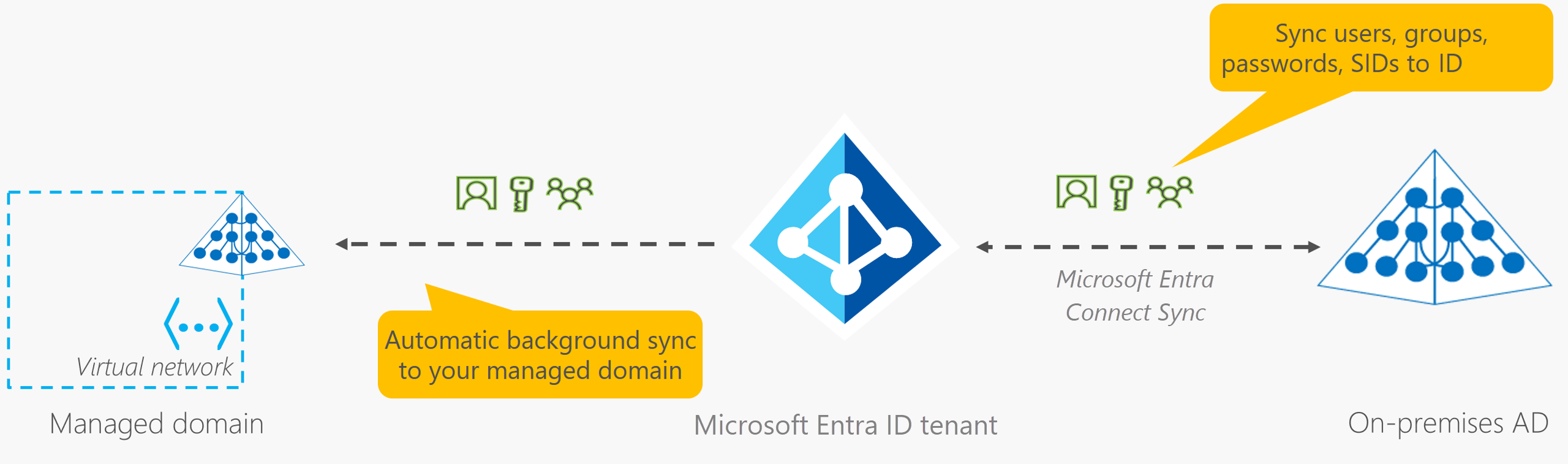
How is information synchronized between Entra ID and AD?
In a hybrid environment with an on-premises AD DS environment, Microsoft Entra Connect synchronizes identity information with Microsoft Entra ID, which is then synchronized to the managed domain.
48
What is Single sign-on?
Enables a user to sign in one time and use that credential to access multiple resources and applications from different providers. For SSO to work, the different applications and providers must trust the initial authenticator.
What is Single sign-on?
Enables a user to sign in one time and use that credential to access multiple resources and applications from different providers. For SSO to work, the different applications and providers must trust the initial authenticator.
49
What's multifactor authentication(MFA)?
The process of prompting a user for an extra form (or factor) of identification during the sign-in process. MFA helps protect against a password compromise in situations where the password was compromised but the second factor wasn't.
What's multifactor authentication(MFA)?
The process of prompting a user for an extra form (or factor) of identification during the sign-in process. MFA helps protect against a password compromise in situations where the password was compromised but the second factor wasn't.
50
What is passwordless authentication?
A convienient way for authentication. A password is removed and replaced with something you have(work computer, phone), plus something you are(Fingerprint authentication into banking app), or something you know(PIN - iPad authentication into Outlook). Microsoft offers Windows Hello, Authenticator App, and FIDO2 security keys
What is passwordless authentication?
A convienient way for authentication. A password is removed and replaced with something you have(work computer, phone), plus something you are(Fingerprint authentication into banking app), or something you know(PIN - iPad authentication into Outlook). Microsoft offers Windows Hello, Authenticator App, and FIDO2 security keys
51
What is an Azure external identity?
A person, device, service, etc. that is outside the organization. Microsoft Entra External ID refers to all the ways one can securely interact with users outside of the organization.
What is an Azure external identity?
A person, device, service, etc. that is outside the organization. Microsoft Entra External ID refers to all the ways one can securely interact with users outside of the organization.
52
Describe Azure conditional access
A tool that Microsoft Entra ID uses to allow (or deny) access to resources based on identity signals. These signals include who the user is, where the user is(location), and what device the user is requesting access from. Microsoft, Google, and most major platforms have conditional access turned on for security.
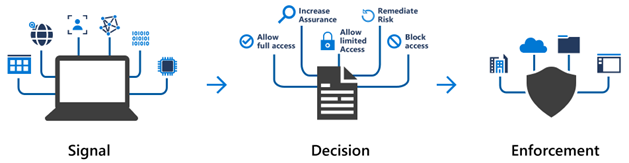
Describe Azure conditional access
A tool that Microsoft Entra ID uses to allow (or deny) access to resources based on identity signals. These signals include who the user is, where the user is(location), and what device the user is requesting access from. Microsoft, Google, and most major platforms have conditional access turned on for security.
53
What is Azure role-based access control(RBAC)?
Built-in roles that describe common access rules for cloud resources. One can also define a role. Each role has an associated set of access permissions that relate to that role. When one assigns individuals or groups to one or more roles, they receive all the associated access permissions.
What is Azure role-based access control(RBAC)?
Built-in roles that describe common access rules for cloud resources. One can also define a role. Each role has an associated set of access permissions that relate to that role. When one assigns individuals or groups to one or more roles, they receive all the associated access permissions.
54
How is Azure RBAC enforced?
Enforced on any action that's initiated against an Azure resource that passes through Azure Resource Manager. Resource Manager is a management service that provides a way to organize and secure your cloud resources.
How is Azure RBAC enforced?
Enforced on any action that's initiated against an Azure resource that passes through Azure Resource Manager. Resource Manager is a management service that provides a way to organize and secure your cloud resources.
55
Describe the Zero Trust model
A security model that assumes the worst case scenario and protects resources with that expectation. Zero Trust assumes breach at the outset, and then verifies each request as though it originated from an uncontrolled network. This requires everyone to authenticate. Then grants access based on authentication rather than location.
Describe the Zero Trust model
A security model that assumes the worst case scenario and protects resources with that expectation. Zero Trust assumes breach at the outset, and then verifies each request as though it originated from an uncontrolled network. This requires everyone to authenticate. Then grants access based on authentication rather than location.
56
Describe defense-in-depth
One can visualize defense-in-depth as a set of layers, with the data to be secured at the center and all the other layers functioning to protect that central data layer. Each layer provides protection so that if one layer is breached, a subsequent layer is already in place to prevent further exposure.
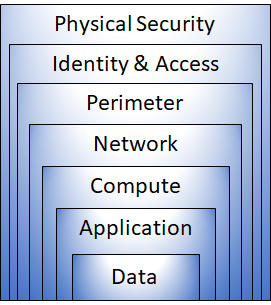
Describe defense-in-depth
One can visualize defense-in-depth as a set of layers, with the data to be secured at the center and all the other layers functioning to protect that central data layer. Each layer provides protection so that if one layer is breached, a subsequent layer is already in place to prevent further exposure.
57
What is Microsoft Defender for Cloud?
A monitoring tool for security posture management and threat protection. It monitors your cloud, on-premises, hybrid, and multicloud environments to provide guidance and notifications aimed at strengthening your security posture.
What is Microsoft Defender for Cloud?
A monitoring tool for security posture management and threat protection. It monitors your cloud, on-premises, hybrid, and multicloud environments to provide guidance and notifications aimed at strengthening your security posture.
58
A user is simultaneously assigned multiple roles that use role-based access control. What are their actual permissions? The role permissions are: Role 1 - read || Role 2 - write || Role 3 - read and write.
Read and write
A user is simultaneously assigned multiple roles that use role-based access control. What are their actual permissions? The role permissions are: Role 1 - read || Role 2 - write || Role 3 - read and write.
Read and write