Chapter 2: Communications
Study these flashcardsFree · spaced repetition · iPhone, Android, Mac & web
All cards
1
What is a Network?
Devices that are inter-connected and communicate between each other.
2
Features of a Network?
- Easily transfer data, like files between devices
- Devices can share resources, such as hardware, printers, or same software
- Store data in drives connected to the network
- Devices can share resources, such as hardware, printers, or same software
- Store data in drives connected to the network
3
What are the two main types of Networks?
Local Are Network (LAN) and Wider Area Network (WAN)
4
Features of LAN?
- Small geographical region
- Private ownership
- Wi-Fi, Copper, and Coaxial mediums
- High speed
- Low congestion
- Private ownership
- Wi-Fi, Copper, and Coaxial mediums
- High speed
- Low congestion
5
Features of WAN?
- Large geographical region
- Private/Public ownership
- PSTN or satellite mediums
- Low speed
- High congestion
- Private/Public ownership
- PSTN or satellite mediums
- Low speed
- High congestion
6
What is a Client server?
The server stores all the data and performs the tasks requewsted by the client
client (sends request) --> server (returns results) --> client (receives results)
e.g:
- web pages
- emails
- company storing files on central server
- print/file/email server
client (sends request) --> server (returns results) --> client (receives results)
e.g:
- web pages
- emails
- company storing files on central server
- print/file/email server
7
Pros and cons of Client-server model
Pros:
- Increases security as only the server has higher privileges
- Increased performance of individuals computers
- Central management of data and software so there is always a backup and each device has consistent software
Cons:
- All operations depend on the main server, if server is down then the others are down too
- Difficult to scale and expensive
- Speed of networks decreases exponentially based on the number of devices connected.
- Increases security as only the server has higher privileges
- Increased performance of individuals computers
- Central management of data and software so there is always a backup and each device has consistent software
Cons:
- All operations depend on the main server, if server is down then the others are down too
- Difficult to scale and expensive
- Speed of networks decreases exponentially based on the number of devices connected.
8
What is a Thin client?
Provides input to the server and receives an output from the server
9
What is a Thick client?
Carriest out some processing on its own before/after sending/receiving data to the server
10
What is Peer-to-peer?
All devices on the netwrok are of equal status, each computer has access to all the data and resources of another device, thus each device is responsible for its own safety.
11
Pros and cons of Peer-to-peer
Pros:
- Setup cost is cheap
- Each device has complete access to any device on t he network
- No central server dependancy
Cons:
- Reduced security, vulnerable to viruses from other devices on the network
- Reduced performance, other devices might also be attempting to access data on a device.
- No central backup of files, if one computer has data and loses it, they all lose access to it.
- Setup cost is cheap
- Each device has complete access to any device on t he network
- No central server dependancy
Cons:
- Reduced security, vulnerable to viruses from other devices on the network
- Reduced performance, other devices might also be attempting to access data on a device.
- No central backup of files, if one computer has data and loses it, they all lose access to it.
12
What are Topologies and their different types?
The way devices are connected on a network:
- Bus
- Star
- Mesh
- Hybrid
- Bus
- Star
- Mesh
- Hybrid
13
What is a Bus topology?
All devices connected to a central cable, has terminators at the end
- Only onecommunication can take place at a time
- Data terminators are needed to prevent a network crash from data collision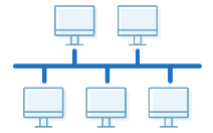
- Only onecommunication can take place at a time
- Data terminators are needed to prevent a network crash from data collision
14
What is a Star topology?
All devices connected to a switch / router independantly
- No collisions can occur and data can be sent out simultaneously
- You can use hub instead of switch but its slower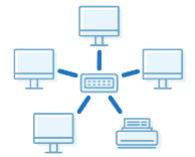
- No collisions can occur and data can be sent out simultaneously
- You can use hub instead of switch but its slower
15
What is a Mesh topology?
All devices on a network are connected to each other
- The internet itself is an example of mesh topology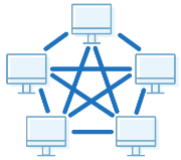
- The internet itself is an example of mesh topology
16
What is a Hybrid topology?
A combination of topologies used together
17
What is Cloud Computing?
Applications and services that deliver over the internet. A third party hosts the data for the user that they can then use. Can exist for public, where it can be used by anyone online, and private use, where it is made specifically for use by a company
18
Pros and Cons of Cloud Computing
Pros:
- Free for small quantities
- Can access data from anywhere if you have internet
- Likely better security and recovery options
Cons:
- Internet access is required to acces it
- Long upload and download time limits access to data
- No control over security and backups
- Free for small quantities
- Can access data from anywhere if you have internet
- Likely better security and recovery options
Cons:
- Internet access is required to acces it
- Long upload and download time limits access to data
- No control over security and backups
19
What are the Transmission Mediums of a network?
- Wired
- Twisted pair / Copper cable
- Fiber-optic cable
- Wierless
- Radio waves
- Micro waves
- Satellites
- Twisted pair / Copper cable
- Fiber-optic cable
- Wierless
- Radio waves
- Micro waves
- Satellites
20
What is a Copper Cable?
Twisted pair of copper wires that carry data as electrical signals
21
What is a Fiber Optic?
Glass/Plastic cables that rely on total internal reflection to transmit data as light
22
Features of a Copper Cable?
- Slow
- Travels short distances; needs repeaters
- Higher risk of interference
- Less safe (lower security)
- High durability
- Low price
- Travels short distances; needs repeaters
- Higher risk of interference
- Less safe (lower security)
- High durability
- Low price
23
Features of a Fibre Optic Cable?
- Fast
- Travels long distances
- Low risk of interference
- Safe (better security)
- Low durability
- High price
- Travels long distances
- Low risk of interference
- Safe (better security)
- Low durability
- High price
24
What are Radio Waves?
An electromagnetic wave that carries data wirelessly; Wi-Fi
25
What are Micro Waves?
An electromagnetic wave that is used to communicate with satellites
26
What are Satellites?
A communication device that orbits the Earth and sends / receives data
27
Features of Radio Waves?
- Cheap
- Other radio waves are its obstacles
- Travels long distances
- Lower size
- Other radio waves are its obstacles
- Travels long distances
- Lower size
28
Features of Micro waves?
- Expensive
- Physical objects are its obstacles
- Travels shorter distances
- High size
- Physical objects are its obstacles
- Travels shorter distances
- High size
29
Features of Satellites?
- Expensive
- High risk of obstacles
- Travels long distances
- High size
- High risk of obstacles
- Travels long distances
- High size
30
What Hardware is used to Support the LAN System?
- Switch
- Server
- Network Interface Card (NIC)
- Wireless Network Interface Card (WNIC)
- Wireless Access Point (WAP)
- Cables
- Bridge
- Repeater
- Server
- Network Interface Card (NIC)
- Wireless Network Interface Card (WNIC)
- Wireless Access Point (WAP)
- Cables
- Bridge
- Repeater
31
What is a Switch?
Connects all devices on a network and simultaneously brodcasts information to those devices
32
What is a Server?
A specialized high-speed computer that handles requests from clients or other computers on the network
33
What is a Network Interface Card (NIC)?
- A hardware component that provides each device a unique MAC address so that it can be identified on a wrieless network.
- It provides an interface by acting as an antenna to a Wi-Fi network. It receives analogue radio waves that it decodes and converts into digital data, and it sends signal data, that it encrypts and converts into analogue waves, via the antenna.
- It checks incoming transmissions to check if they match the device's IP / MAC address and ignores them if they're not.
- It provides an interface by acting as an antenna to a Wi-Fi network. It receives analogue radio waves that it decodes and converts into digital data, and it sends signal data, that it encrypts and converts into analogue waves, via the antenna.
- It checks incoming transmissions to check if they match the device's IP / MAC address and ignores them if they're not.
34
What is a Wireless Network Interface Card (WNIC)?
Hardware component that allows a device to connect to a wireless network // Provides a MAC address to the device to identify it on the wireless network
35
What is a Wireless Acces Point (WAP)?
Hardware component that provides radio communication from the central device to nodes on the network (and vice versa)
36
Features of Wireless Access Point?
• To receive packets from devices or the Internet
• To forward / route packets to the destination
• To find the destination of the packet
• To assign / allocate private IP addresses to devices on LAN
• To store / update / maintain a routing table
• To find the most efficient path to the destination
• To maintain a table of MAC and IP addresses
• To forward / route packets to the destination
• To find the destination of the packet
• To assign / allocate private IP addresses to devices on LAN
• To store / update / maintain a routing table
• To find the most efficient path to the destination
• To maintain a table of MAC and IP addresses
37
What is a Cable?
Physical means of sending and receiving data on a network
38
What is a Bridge?
A device that interconnects two or more LANs together and forwards data packets
39
What is a Repeater?
Restores the digital signal so it can be transmitted over greater distances
40
What is a Router?
Receives and sends data between two networks operating on the same protocol
- Can be used to segment a network
- Can be used to segment a network
41
Functions of a Router?
- Maintain a table of MAC and IP addresses
- Assign private IPs to a device on a network
- Routes packets to their destination but doesn not direct packets to each device attached to it
- To receive packets from devices or the Internet
- Assign private IPs to a device on a network
- Routes packets to their destination but doesn not direct packets to each device attached to it
- To receive packets from devices or the Internet
42
What is an Ethernet?
The most common form of wired connection used in LAN and WAN that is based on Bus topology.
- Due to this it is possible for data collisions to occur, hence a Carrier Sense Multiple Access / Collision Detection (CSMA/CD) is used.
- Due to this it is possible for data collisions to occur, hence a Carrier Sense Multiple Access / Collision Detection (CSMA/CD) is used.
43
What is Carrier Sense Multiple Access / Collision Detection (CSMA/CD)?
-A workstation listens to the communication channel, when it receives a request first it will check if the line is empty, if empty sends data.
-- If a collision occurs because both devices checked if the line was empty at the same time, then the workstation will send an abort signal and the data will be sent back.
--- And a random wait time is assigned to each device before resending
-- If a collision occurs because both devices checked if the line was empty at the same time, then the workstation will send an abort signal and the data will be sent back.
--- And a random wait time is assigned to each device before resending
44
Features of Wired Internet?
- Faster
- More stable
- More secure
- Restricted movement
- High cabling
- Difficult to expand
- More stable
- More secure
- Restricted movement
- High cabling
- Difficult to expand
45
Features of Wireless Internet?
- Slower
- Less stable
- Less secure
- Free movement
- Less cabling
- Easy to expand
- Less stable
- Less secure
- Free movement
- Less cabling
- Easy to expand
46
Internet Hardware?
- Modem
- Public Switch Telephone Network (PSTN)
- Dedicated lines
- Cell phone network
- Public Switch Telephone Network (PSTN)
- Dedicated lines
- Cell phone network
47
What is a Modem?
A device that allows users to connect to the internet via telephone line; converts analogue signals into digital signals.
48
What is a Public Switch Telephone Network (PSTN)?
Full duplex form of communication over wire via circuit swtiching that remains active during power outages
49
What is a Dedicated Line?
A permanent connection for communication that is expensive but faster and more secure/consistent
50
What is a Cell Phone Network?
A wireless connection that relies on mobile connection and cell towers that use radio waves
51
What is Bit Streaming?
- A video is compressed and is then sent as a continuous stream of bits. When it is downloaded the server sends the data to the buffer which then sends a continuous stream of data to the user
- Higher bit-rate speed and broadband speed means users can stream the video faster and with less buffering
- Higher bit-rate speed and broadband speed means users can stream the video faster and with less buffering
52
Methods of Bit Streaming?
- Real time
- On demand
- On demand
53
What is Real-Time Bit Streaming?
Used when watching a live stream of events that are currently taking place. The event is captured live with a video camera connected to a computer, and it cannot be paused or rewound.
54
What is On-Demand Bit Streaming?
Used when watching an event that has taken place in the past. Existing media are encoded to bit streaming format and uploaded to a server. It can be paused and rewound.
55
Types of Video Redundancies?
• Temporal - Sequence of consecutive pixels have the same value on a frame
• Spatial - Sequence of consecutive pixels between frames have the same value
• Spatial - Sequence of consecutive pixels between frames have the same value
56
What is the World Wide Web (WWW)?
A collection of websites that are available on the internet. When you access a website, you are using both the internet and the world wide web because the website is stored on WWW but the internet provides the necessary infrastructure.
57
What is an IP Address?
- The unique address that identifies a device a network and to allow router to send data from the internet to the device.
- It has two formats:
• IPv4
• IPv6
- It has two formats:
• IPv4
• IPv6
58
Features of IPv4?
- 4 groups
- Group range: 0-255
- Separator = .
- Size is 32 bits
- Example : 192.168. 1.1
- Group range: 0-255
- Separator = .
- Size is 32 bits
- Example : 192.168. 1.1
59
Features of IPv6?
- 8 groups
- Group range = 0-65535
- Separator = :
- Size is 64 bits
- Example : fe80:d4a8:6435:d2d8:d9f3b11
- Group range = 0-65535
- Separator = :
- Size is 64 bits
- Example : fe80:d4a8:6435:d2d8:d9f3b11
60
What are the types of IP addresses?
- Public
- Private
- Static
- Dynamic
- Private
- Static
- Dynamic
61
What is a Public address?
Assigned by the IP visible on the internet, must be unique on the internet.
Only the router has a public IP address, devices on the netwrok do not as all data passes through the router, which also protects the device from external threats.
Only the router has a public IP address, devices on the netwrok do not as all data passes through the router, which also protects the device from external threats.
62
What is a Private address?
Assigned by the router that is visible to devices on the network, must be unique on that specific network.
63
What is a Static address?
Remains constant, whenever a device connects to the internet. Webpages need Satatic IP addresses so the DNS does not need to be updated everytime which can cause delays and errors.
64
What is a Dynamic address?
A new IP address is allocated every time a device connects to the internet.
65
What is Subnetting?
Dividing a network into smaller groups
66
Advantages of Subnetting?
- Reduces traffic
- More secure
- More secure
67
What is a URL?
Uniform Resource Locator, easier way to remember IP addresses for websites.
- e.g, Duck.com = 52.250.42.157, Google.com = 2a00:1450:4019:80c::200e
- e.g, Duck.com = 52.250.42.157, Google.com = 2a00:1450:4019:80c::200e
68
What is a DNS?
Domain Name Server, the DNS looks up the URL within a table, if it finds the corresponding IP address, it's then returned to the client. If it's unable to find it, the request is forwarded to a higher DNS.