A-level Computer Science Paper 1
Study these flashcardsFree · spaced repetition · iPhone, Android, Mac & web
All cards
1
What is Hexadecimal?
Base 16, from 0-9 to A-F
2
Usages of Hexadecimal?
- In MAC and IP Addresses
- Represent Colours in HTML
- In error messages and memory dumps
- Represent Colours in HTML
- In error messages and memory dumps
3
What are the Binary prefixes?
Kibi (Ki) = 1024 bytes
Mebi (Mi) = 1024 KiB
Gibi (Gi) = 1024 MiB
Tebi (Ti) = 1024 GiB
Mebi (Mi) = 1024 KiB
Gibi (Gi) = 1024 MiB
Tebi (Ti) = 1024 GiB
4
What are the Denary prefixes?
Kilo (k) = 1000 bytes
Mega (M) = 1000 Kb
Giga (G) = 1000 Mb
Tera (T) = 1000 Gb
Mega (M) = 1000 Kb
Giga (G) = 1000 Mb
Tera (T) = 1000 Gb
5
What is Binary Coded Decimal (BCD)?
Each character is represented by a 4-bit binary number
example (19 in BCD): - 00011001
- 0001 (= 1) 1001 (= 9)
- 19
example (19 in BCD): - 00011001
- 0001 (= 1) 1001 (= 9)
- 19
6
Usage of Binary Coded Decimal (BCD)?
- Used to represent numbers in calculators and counters
- Allows you to accurately measure fractions
- Electronically code decimal numbers
- Allows you to accurately measure fractions
- Electronically code decimal numbers
7
What are the three character sets?
ASCII, Extended ASCII, Unicode
8
ASCII
American Standard Code for Information Interchange
- 128 characters
- Only from the English language
- 7 bits
- 128 characters
- Only from the English language
- 7 bits
9
Extended ASCII
- 256 characters
- Most European langauges including English
- 8 bits
- Most European langauges including English
- 8 bits
10
Unicode
- 10,000 characters
- variety of languages
- current standard
- 32 bits
- variety of languages
- current standard
- 32 bits
11
What is a pixel?
The smalles unit of area in an image representing a single colour
12
What is a file header
Contains data about the image
- Size
- Resolution
- Colour depth
- Number of colours
- Size
- Resolution
- Colour depth
- Number of colours
13
What is image resolution?
The number of pixels displayed by a screen at a time
14
What is bit depth / colour depth?
The number of bits used to represent each colour
15
How do you calculate Image Size?
Image size = Image resolution x Bit/Colour depth
16
What are features of Lossy image compression?
- Reducing bit depth, fewer bits used to store each pixel in an image
- Reducing colour palette, less colours and therefore less bits per pixel
- Reduced image resolution, fewer pixels per unit area so less space is needed
- Reducing colour palette, less colours and therefore less bits per pixel
- Reduced image resolution, fewer pixels per unit area so less space is needed
17
How is Lossy image compreesion done?
Using Run Length Encoding (RLE), looks for a seires of consecutive pixels that store the same colour, indexes the colour and the number of times it occurs.
18
What are vector images?
A series of Geometric shapes made with mathematical formulas
19
Features of vector images?
- Can be scaled without losing quality as it gets recalculated.
- Relatively small file size, stores equations not pixels.
- Relatively small file size, stores equations not pixels.
20
What is sampling resolution?
The number of bits used to store each sample.
- Larger values mean more accurate reconstruction of sound but higher file size (more bits used to store the sound)
- Larger values mean more accurate reconstruction of sound but higher file size (more bits used to store the sound)
21
How to calculate sound size?
Sound size = sampling rate x sampling resolution x time
22
What is analogue data?
Continous real-world data
23
What is digital data?
Discrete electrical data
24
What is compression
The reduction of file size
25
Advantages of compression
- Reduces transfer time
- Saves bandwidth
- Saves storage space
- Saves bandwidth
- Saves storage space
26
What are the two methods of compression?
Lossy and Lossless
27
What is Lossy compression?
File size compression where original data is lost and cannot be recovered
28
Features of Lossy compression?
- smaller file size than lossless
- Useful for when significant size reduction is needed
- Significant loss in quality
- Useful for when significant size reduction is needed
- Significant loss in quality
29
What is Lossless compression?
File size compression where original data is not lost and can be recovered
30
Features of Lossless compression?
- Maintains quality
- useful when all original data needs to be recovered
- useful when all original data needs to be recovered
31
What is a network?
Devices that are inter-connected and communicate between each other.
32
Features of a network?
- Easily transfer data, like files between devices
- Devices can share resources, such as hardware, printers, or same software
- Store data in drives connected to the network
- Devices can share resources, such as hardware, printers, or same software
- Store data in drives connected to the network
33
What are the two main types of networks?
Local Are Network (LAN) and Wider Area Network (WAN)
34
Features of LAN?
- Small geographical region
- Private ownership
- Wi-Fi, Copper, and Coaxial mediums
- High speed
- Low congestion
- Private ownership
- Wi-Fi, Copper, and Coaxial mediums
- High speed
- Low congestion
35
Features of WAN?
- Large geographical region
- Private/Public ownership
- PSTN or satellite mediums
- Low speed
- High congestion
- Private/Public ownership
- PSTN or satellite mediums
- Low speed
- High congestion
36
What is a client server?
The server stores all the data and performs the tasks requewsted by the client
client (sends request) --> server (returns results) --> client (receives results)
e.g:
- web pages
- emails
- company storing files on central server
- print/file/email server
client (sends request) --> server (returns results) --> client (receives results)
e.g:
- web pages
- emails
- company storing files on central server
- print/file/email server
37
Pros and cons of client-server model
Pros:
- Increases security as only the server has higher privileges
- Increased performance of individuals computers
- Central management of data and software so there is always a backup and each device has consistent software
Cons:
- All operations depend on the main server, if server is down then the others are down too
- Difficult to scale and expensive
- Speed of networks decreases exponentially based on the number of devices connected.
- Increases security as only the server has higher privileges
- Increased performance of individuals computers
- Central management of data and software so there is always a backup and each device has consistent software
Cons:
- All operations depend on the main server, if server is down then the others are down too
- Difficult to scale and expensive
- Speed of networks decreases exponentially based on the number of devices connected.
38
What is a thin client?
Provides input to the server and receives an output from the server
39
What is a thick client?
Carriest out some processing on its own before/after sending/receiving data to the server
40
What is peer-to-peer?
All devices on the netwrok are of equal status, each computer has access to all the data and resources of another device, thus each device is responsible for its own safety.
41
Pros and cons of peer-to-peer
Pros:
- setup cost is cheap
- each device has complete access to any device on t he network
- no central server dependancy
Cons:
- reduced security, vulnerable to viruses from other devices on the network
- reduced performance, other devices might also be attempting to access data on a device.
- no central backup of files, if one computer has data and loses it, they all lose access to it.
- setup cost is cheap
- each device has complete access to any device on t he network
- no central server dependancy
Cons:
- reduced security, vulnerable to viruses from other devices on the network
- reduced performance, other devices might also be attempting to access data on a device.
- no central backup of files, if one computer has data and loses it, they all lose access to it.
42
What are topologies and their different types?
The way devices are connected on a network:
- Bus
- Star
- Mesh
- Hybrid
- Bus
- Star
- Mesh
- Hybrid
43
What is a bus topology?
All devices connected to a central cable, has terminators at the end
- Only onecommunication can take place at a time
- Data terminators are needed to prevent a network crash from data collision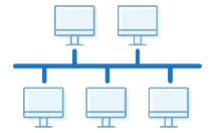
- Only onecommunication can take place at a time
- Data terminators are needed to prevent a network crash from data collision
44
What is a star topology?
All devices connected to a central switch / router via its own route
- No collisions can occur and data can be sent out simultaneously
- You can use hub instead of switch but its slower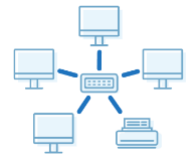
- No collisions can occur and data can be sent out simultaneously
- You can use hub instead of switch but its slower
45
What is a mesh topology?
All devices on a network are connected to each other
- The internet itself is an example of mesh topology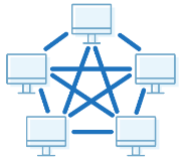
- The internet itself is an example of mesh topology
46
What is a hybrid topology?
A combination of topologies used together
47
What is Cloud Computing?
Applications and services that deliver over the internet. A third party hosts the data for the user that they can then use. Can exist for public, where it can be used by anyone online, and private use, where it is made specifically for use by a company
48
Pros and Cons of Cloud Computing
Pros:
- Free for small quantities
- Can access data from anywhere if you have internet
- Likely better security and recovery options
Cons:
- Internet access is required to acces it
- Long upload and download time limits access to data
- No control over security and backups
- Free for small quantities
- Can access data from anywhere if you have internet
- Likely better security and recovery options
Cons:
- Internet access is required to acces it
- Long upload and download time limits access to data
- No control over security and backups
49
Transmission Mediums?
- Wired
- Twisted pair / Copper cable
- Fiber-optic cable
- Wierless
- Radio waves
- Micro waves
- Satellites
- Twisted pair / Copper cable
- Fiber-optic cable
- Wierless
- Radio waves
- Micro waves
- Satellites
50
What is a Copper Cable?
Twisted pair of copper wires that carry data as electrical signals
51
What is a Fiber Optic?
Glass/Plastic cables that rely on total internal reflection to transmit data as light
52
Features of a Copper Cable?
- Slow
- Travels short distances; needs repeaters
- Higher risk of interference
- Less safe (lower security)
- High durability
- Low price
- Travels short distances; needs repeaters
- Higher risk of interference
- Less safe (lower security)
- High durability
- Low price
53
Features of a Fibre Optic Cable?
- Fast
- Travels long distances
- Low risk of interference
- Safe (better security)
- Low durability
- High price
- Travels long distances
- Low risk of interference
- Safe (better security)
- Low durability
- High price
54
What are Radio Waves?
An electromagnetic wave that carries data wirelessly; Wi-Fi
55
What are Micro Waves?
An electromagnetic wave that is used to communicate with satellites
56
What are Satellites?
A communication device that orbits the Earth and sends / receives data
57
Features of Radio Waves?
- Cheap
- Other radio waves are its obstacles
- Travels long distances
- Lower size
- Other radio waves are its obstacles
- Travels long distances
- Lower size
58
Features of Micro waves?
- Expensive
- Physical objects are its obstacles
- Travels shorter distances
- High size
- Physical objects are its obstacles
- Travels shorter distances
- High size
59
Features of Satellites?
- Expensive
- High risk of obstacles
- Travels long distances
- High size
- High risk of obstacles
- Travels long distances
- High size
60
What Hardware is used to Support the LAN System?
- Switch
- Server
- Network Interface Card (NIC)
- Wireless Network Interface Card (WNIC)
- Wireless Access Point (WAP)
- Cables
- Bridge
- Repeater
- Server
- Network Interface Card (NIC)
- Wireless Network Interface Card (WNIC)
- Wireless Access Point (WAP)
- Cables
- Bridge
- Repeater
61
What is a Switch?
Connects all devices on a network and simultaneously brodcasts information to those devices
62
What is a Server?
A specialized high-speed computer that handles requests from clients or other computers on the network
63
What is a Network Interface Card (NIC)?
- A hardware component that provides each device a unique MAC address so that it can be identified on a wrieless network.
- It provides an interface by acting as an antenna to a Wi-Fi network. It receives analogue radio waves that it decodes and converts into digital data, and it sends signal data, that it encrypts and converts into analogue waves, via the antenna.
- It checks incoming transmissions to check if they match the device's IP / MAC address and ignores them if they're not.
- It provides an interface by acting as an antenna to a Wi-Fi network. It receives analogue radio waves that it decodes and converts into digital data, and it sends signal data, that it encrypts and converts into analogue waves, via the antenna.
- It checks incoming transmissions to check if they match the device's IP / MAC address and ignores them if they're not.
64
What is a Wireless Acces Point (WAP)?
It allows devices to connect to the network wirelessly that is usually built into a router; such as Wi-Fi
65
What is a Cable?
Physical means of sending and receiving data on a network
66
What is a Bridge?
A device that interconnects two or more LANs together and forwards data packets
67
What is a Repeater?
A network device that amplifies or regenerates a signal to prevent it from being lost or corrupted
68
Features of a Router?
- Connects two networks that rely on similar protocols
- Can be used to segment a network
- Can be used to segment a network
69
Features of a Gateway?
- Connects two networks that rely on different protocols
70
Features of both Routers and Gateways?
- Connect two or more networks
- Receive packets and redirect them to the destination using the IP of the destination
- Assign private IPs
- Receive packets and redirect them to the destination using the IP of the destination
- Assign private IPs
71
- Maintain a table of MAC and IP addresses
- Assign private IPs to a device on a network
- Routes packets to their destination but doesn not direct packets to each device attached to it
- To receive packets from devices or the Internet
Functions of a Router?
- Maintain a table of MAC and IP addresses
- Assign private IPs to a device on a network
- Routes packets to their destination but doesn not direct packets to each device attached to it
- To receive packets from devices or the Internet
72
What is an Ethernet?
- The most common form of wired connection used in LAN and WAN that is based on Bus topology.
- Due to this it is possible for data collisions to occur, hence a Carrier Sense Multiple Access / Collision Detection (CSMA/CD) is used.
- A workstation listens to the communication channel; when it receives a request first it will check if the line is empty, if empty sends data.
- If a collision occurs because both devices checked if the line was empty at the same time, then the workstation will send an abort signal and the data will be sent back. A random wait time is assigned to eahc device before resending
- Due to this it is possible for data collisions to occur, hence a Carrier Sense Multiple Access / Collision Detection (CSMA/CD) is used.
- A workstation listens to the communication channel; when it receives a request first it will check if the line is empty, if empty sends data.
- If a collision occurs because both devices checked if the line was empty at the same time, then the workstation will send an abort signal and the data will be sent back. A random wait time is assigned to eahc device before resending
73
Features of Wired Internet?
- Faster
- More stable
- More secure
- Restricted movement
- High cabling
- Difficult to expand
- More stable
- More secure
- Restricted movement
- High cabling
- Difficult to expand
74
Features of Wireless Internet?
- Slower
- Less stable
- Less secure
- Free movement
- Less cabling
- Easy to expand
- Less stable
- Less secure
- Free movement
- Less cabling
- Easy to expand
75
Internet Hardware?
- Modem
- Public Switch Telephone Network (PSTN)
- Dedicated lines
- Cell phone network
- Public Switch Telephone Network (PSTN)
- Dedicated lines
- Cell phone network
76
What is a Modem?
A device that allows users to connect to the internet via telephone line; converts analogue signals into digital signals.
77
What is a Public Switch Telephone Network (PSTN)?
Full duplex form of communication over wire via circuit swtiching that remains active during power outages
78
What is a Dedicated Line?
A permanent connection for communication that is expensive but faster and more secure/consistent
79
What is a Cell Phone Network?
A wireless connection that relies on mobile connection and cell towers that use radio waves
80
What is Bit Streaming?
- A video is compressed and is then sent as a continuous stream of bits. When it is downloaded the server sends the data to the buffer which then sends a continuous stream of data to the user
- Higher bit-rate speed and broadband speed means users can stream the video faster and with less buffering
- Higher bit-rate speed and broadband speed means users can stream the video faster and with less buffering
81
Methods of Bit Streaming?
- Real time
- On demand
- On demand
82
What is Real-Time Bit Streaming?
Used when watching a live stream of events that are currently taking place. The event is captured live with a video camera connected to a computer, and it cannot be paused or rewound.
83
What is On-Demand Bit Streaming?
Used when watching an event that has taken place in the past. Existing media are encoded to bit streaming format and uploaded to a server. It can be paused and rewound.
84
Types of Video Redundancies?
• Temporal - Sequence of consecutive pixels have the same value on a frame
• Spatial - Sequence of consecutive pixels between frames have the same value
• Spatial - Sequence of consecutive pixels between frames have the same value
85
What is the World Wide Web (WWW)?
A collection of websites that are available on the internet. When you access a website, you are using both the internet and the world wide web because the website is stored on WWW but the internet provides the necessary infrastructure.
86
What is an IP Address?
- The unique address that identifies a device a network and to allow router to send data from the internet to the device.
- It has two formats:
• IPv4
• IPv6
- It has two formats:
• IPv4
• IPv6
87
Features of IPv4?
- 4 groups
- Group range: 0-255
- Separator = .
- Size is 32 bits
- Example : 192.168. 1.1
- Group range: 0-255
- Separator = .
- Size is 32 bits
- Example : 192.168. 1.1
88
Features of IPv6?
- 8 groups
- Group range = 0-65535
- Separator = :
- Size is 64 bits
- Example : fe80:d4a8:6435:d2d8:d9f3b11
- Group range = 0-65535
- Separator = :
- Size is 64 bits
- Example : fe80:d4a8:6435:d2d8:d9f3b11
89
What are the types of IP addresses?
- Public
- Private
- Static
- Dynamic
- Private
- Static
- Dynamic
90
What is a Public address?
Assigned by the IP visible on the internet, must be unique on the internet.
Only the router has a public IP address, devices on the netwrok do not as all data passes through the router, which also protects the device from external threats.
Only the router has a public IP address, devices on the netwrok do not as all data passes through the router, which also protects the device from external threats.
91
What is a Private address?
Assigned by the router that is visible to devices on the network, must be unique on that specific network.
92
What is a Static address?
Remains constant, whenever a device connects to the internet. Webpages need Satatic IP addresses so the DNS does not need to be updated everytime which can cause delays and errors.
93
What is a Dynamic address?
A new IP address is allocated every time a device connects to the internet.
94
What is Subnetting?
Dividing a network into smaller groups
95
Advantages of Subnetting?
- Reduces traffic
- More secure
- More secure
96
What is a URL?
Uniform Resource Locator, easier way to remember IP addresses for websites.
- example: Duck.com = 52.250.42.157
- example: Duck.com = 52.250.42.157
97
What is a DNS?
Domain Name Server, the DNS looks up the URL within a table, if it finds the corresponding IP address, it's then returned to the client. If it's unable to find it, the request is forwarded to a higher DNS.
98
What is Primary storage?
99
What is Secondary Storage?
100
What is Read-Only Memory (ROM)?
- Non-volatile
- Slow write speed
- Stores basic information that a device needs to operate / boot
- Stores information that does not change or needs to be retained even when the device is turned off
- Slow write speed
- Stores basic information that a device needs to operate / boot
- Stores information that does not change or needs to be retained even when the device is turned off
101
Types of ROM?
- Programmable ROM (PROM)
- Erasable Programmable ROM (EPROM)
- Electronically Erasble Programmable ROM (EEPROM)
- Erasable Programmable ROM (EPROM)
- Electronically Erasble Programmable ROM (EEPROM)
102
What is a Programmable ROM (PROM)?
A ROM chip that is initially empty but can be written to once
103
What is Erasable Programmable ROM (EPROM)?
A PROM chip that can be erased by using a UV light to heat up the circuit. Can be overwritten may times. EPROM needs to be completely erased before overwriting.
104
What is Electronically Erasable Programmable ROM (EEPROM)?
An EEPROM chip that can be erased electronically using voltage. It is a type of flash memory that means it can be rewritten quickly and many times. EEPROM can be partially erased and overwritten.
105
What is Random Access Memory?
Volatile with fast read and write speed that stores the current program in use
106
Types of RAM?
- Static RAM (SRAM)
- Dynamic RAM (DRAM)
- Dynamic RAM (DRAM)
107
What is Static RAM (SRAM)?
A type of RAM in which data remains constant if power is supplied. It is commonly used as CPU cashe and buffers due to its low storage capacity. Transistors are arranged as flip flops.
108
What is Dyanamic RAM (DRAM)?
A type of RAM that stores each bit on a capacitor and therefore needs to be constantly refreshed. DRAM is used for personal computers and webserves as it's cheaper. Transistors are arranged as capacitors.
109
Differences between ROM and RAM?
ROM:
- Uses MBs
- Non-volatile
- Slower
RAM:
- Uses GBs
- Volatile
- Fast
- Uses MBs
- Non-volatile
- Slower
RAM:
- Uses GBs
- Volatile
- Fast
110
Differences Between DRAM and SRAM?
DRAM:
- Cheap
- Slow
- Low power use
- Low heat produced
- High capacity
SRAM:
- Expensive
- Fast
- High poer use
- High heat produced
- Low capacity
- Cheap
- Slow
- Low power use
- Low heat produced
- High capacity
SRAM:
- Expensive
- Fast
- High poer use
- High heat produced
- Low capacity
111
What is a Hard Disk Drive (HDD)?
-A hard disk has one or more platters mounted on a spindle.
-The platter is divided into concentric tracks and sectors.
- It is spun at a very fast speed.
- A read and write head is mounted on an arm above the surface.
- The data is encoded as magnetic patterns.
-The platter is divided into concentric tracks and sectors.
- It is spun at a very fast speed.
- A read and write head is mounted on an arm above the surface.
- The data is encoded as magnetic patterns.
112
What is Solid State Drive (SSD)?
- Blocks of transistors are arranged in a grid with two transistors at each intersection; the floating gate and the control gate.
- Memory cells stores 0s and 1s.
- Movement of electrons is controlled for read and write operations.
- Memory cells stores 0s and 1s.
- Movement of electrons is controlled for read and write operations.
113
What is Buffer?
A temporary storage usually in the RAM that is used due to speed incompatibility between devices. Such as a video buffer when steaming videos.
114
What is an Embedded system?
An integrated system with microprocessor within a larger system that performs one specific task.
115
Pros and cons of Embedded systems?
Pros:
- Compactandfast
- Consumes less power and is very reliable
- Cheap
Cons:
- Tedious and difficult to upgrade
- Time needed to maintain it
- Hard to backup
- Not easily changed by device’s owner
- Compactandfast
- Consumes less power and is very reliable
- Cheap
Cons:
- Tedious and difficult to upgrade
- Time needed to maintain it
- Hard to backup
- Not easily changed by device’s owner
116
Examples of Input/Output Devices
- Laser Printer
- 3D Printer
- Microphone
- Speaker
- Optical Disc Reader
- Touch Screen
- 3D Printer
- Microphone
- Speaker
- Optical Disc Reader
- Touch Screen
117
What is a Laser printer?
- The drum is positively charged.
- As it rotates it is hit by a laser in certain areas to remove the positive charge and make it negative.
- The drum is coated with a positively charged toner which sticks to the negative area.
- As a piece of paper is rolled in, the toner sticks to it.
- The ink is melted so that it continues to stick to the paper even after charge is removed.
- As it rotates it is hit by a laser in certain areas to remove the positive charge and make it negative.
- The drum is coated with a positively charged toner which sticks to the negative area.
- As a piece of paper is rolled in, the toner sticks to it.
- The ink is melted so that it continues to stick to the paper even after charge is removed.
118
What is 3D printer
- A 3D design is made using CAD. The design is split into layers that are transmitted one by one to the printer.
- The printer head can move in all cardinal directions squirting out material. This is repeated for every layer.
- After that it needs to be cured; either by removing excess material or letting the material dry/harden.
- The printer head can move in all cardinal directions squirting out material. This is repeated for every layer.
- After that it needs to be cured; either by removing excess material or letting the material dry/harden.
119
What is a Microphone?
- As sound is passed into the diaphragm is vibrates.
- The diaphragm is connected to a circuit where the vibrations cause a change in the electrical signal.
- The analogue signal is then converted into a digital signal by an ADC.
- The diaphragm is connected to a circuit where the vibrations cause a change in the electrical signal.
- The analogue signal is then converted into a digital signal by an ADC.
120
What is a Speaker?
The digital signal is converted by a DAC.
- The analogue signal is then sent as current to a speaker. The current passes through the coil creating an electromagnet, which is attached to the diaphragm.
Changes in the sound affect the direction of the current. The electromagnet is constantly being attacked / repelled by a permanent magnet causing the diaphragm to vibrate and produce sound.
- The analogue signal is then sent as current to a speaker. The current passes through the coil creating an electromagnet, which is attached to the diaphragm.
Changes in the sound affect the direction of the current. The electromagnet is constantly being attacked / repelled by a permanent magnet causing the diaphragm to vibrate and produce sound.
121
What is a Optical Disc Reader?
122
What are the two types of touch screens?
123
What is a Resistive touchscreen?
124
What is a Virtual reality headset?
A headset contains two eye pieces which display images from a controlling system; when looked through simulates being in a 3D environment.
When the user moves their head or uses the controlling device they can move and look around in the environment
When the user moves their head or uses the controlling device they can move and look around in the environment
125
What is a Capacitive touchscreen?
126
What are sensors?
Sensors are input devices that provide data based on real-word data.
- Temperature
- Infrared
- Pressure
- Sound
Actuators are used in tandem with sensors, they provide the output.
- Temperature
- Infrared
- Pressure
- Sound
Actuators are used in tandem with sensors, they provide the output.
127
What are the two types of systems with sensors?
- Monitoring
- Controlling
- Controlling
128
What is a Monitoring system for sensors?
A system where sensors are used to detect changes, they cannot resolve the issue itself.
e.g, if a temperature gets too high, it will turn on a red light. Human intervention is needed
e.g, if a temperature gets too high, it will turn on a red light. Human intervention is needed
129
What is a Controlling system for sensors?
A system where sensors are used to detect changes and resolve the issue.
e.g, if a temperature gets too high, it will turn on the air conditioning. No human intervention is needed
e.g, if a temperature gets too high, it will turn on the air conditioning. No human intervention is needed
130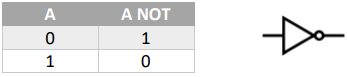
Logic Gate: NOT
131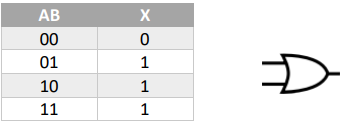
Logic Gate: OR
132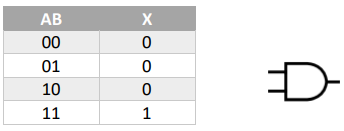
Logic Gate: AND
133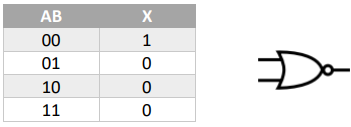
Logic Gate: NOR
134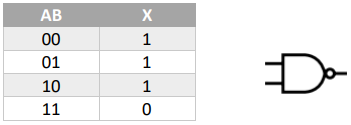
Logic Gate: NAND
135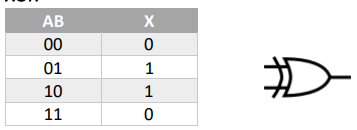
Logic Gate: XOR
136
What is the Fetch-Execute Cycle?
1. Contents of PC are copied to MAR
2. PC is incrimented by 1
3. MAR fetches data at given address and loads into the MDR
4. Contents of MDR copied to CIR
5. Instructions are decoded by CPU; executed by CIR
6. Cycle repeats.
2. PC is incrimented by 1
3. MAR fetches data at given address and loads into the MDR
4. Contents of MDR copied to CIR
5. Instructions are decoded by CPU; executed by CIR
6. Cycle repeats.
137
What are Registers?
Temporary storage of data that needs to be or has been processed
138
Types of registers in a computer
- Program Counter (PC)
- Memory Data Register (MDR)
- Memory Address Register (MAR)
- Current Instruction Register (CIR)
- Index Register (IX)
- Accumulator (ACC)
- Status Register (SR)
- Memory Data Register (MDR)
- Memory Address Register (MAR)
- Current Instruction Register (CIR)
- Index Register (IX)
- Accumulator (ACC)
- Status Register (SR)
139
What is a Program Counter (PC)?
Stores address of the next instruction to be fetched
140
What is a Memory Data Register (MAR)?
Stores data received from Memory.
141
What is a Memory Address Register (MAR)?
Stores address where data needs that needs to be fetched is located then sent to MDR.
142
What is the Current Instruction Register (CIR)?
Stores data received from MDR
143
What is an Index Register (IX)?
Stores a value that is used to calculate an address.
144
What is an Accumulator (ACC)?
Stores values temporarily after an execution of instruction by the ALU
145
What is a Status Regsiter (SR)?
Contains independant bits/flags; each flag is set based on an event
146
What is an Arithmetic Logic Unit (ALU)?
Carries out arithmetic and logical operations like input and output; part of the processor
147
What is the Control Unit (CU)?
Sends & receives signals to control operations like input and output; helps coordinate actions of different components
148
What is the Immediate Acces Store (IAS)?
A memory unit that is directly accessed by the processor
149
What is the System Clock?
Generates the timing signals that synchronises the components on the motherboard
150
What factors affect performance?
- Processor type and number of cores
- Cache Memory
- Bus Width
- Clock Speed
- Cache Memory
- Bus Width
- Clock Speed
151
What is Clock Speed?
Each instruction is executed on a single clock pulse; the faster the clock speed, the more instructions that can be executed per second.
152
What is Bus Width?
The number of directly addressable memory locations to transfer data between.
153
What is Cache memory?
Stores frequently / recently used information so that it can be quickly accessed
154
What is Universal Serial Bus (USB)?
Connects through USB port (on PC) for input and output devices,
(bi-directional data transfer, meaning can read and write data on USB drive)
(bi-directional data transfer, meaning can read and write data on USB drive)
155
What is Video Graphics Array (VGA)?
Only connects to output devices,
- Unidirectional port
- Allows transmission of video transissions; no audio
- Unidirectional port
- Allows transmission of video transissions; no audio
156
What is High Definition Multimedia Interface (HDMI)?
Only connects to output devices
- Transmit high-bandwidth&resolution video and audio streams through HDMI ports.
- Transmit high-bandwidth&resolution video and audio streams through HDMI ports.
157
What is a Data Bus?
Bidirectional bus that carries data instructions between CPU, memory, and I/O devices
158
What is a Control Bus?
Unidirectional bus that address of main memory location or I/O device aout to be used, from CPU to MAR
159
What is an Address Bus?
- Bidirectional & Unidirectional
- Tranmits control signals from Control Unit (CU) to memory (RAM) or I/O devices to initiate data transfer
- Tranmits control signals from Control Unit (CU) to memory (RAM) or I/O devices to initiate data transfer
160
What are Interrupts?
A signal from a program seeking processors attention.
- Interrupt Service Routine (ISR)
- Handles interrupts by controlling the processor
- Different ISRs used for different sources of interrupt.
- Interrupt Service Routine (ISR)
- Handles interrupts by controlling the processor
- Different ISRs used for different sources of interrupt.
161
What is Assembly language?
A low-level programming language with instructions made up of Opcodes and Operands
162
What are the modes of addressing in Assembly?
- Immediate
- Direct
- Indirect
- Indexed
- Relative
- Direct
- Indirect
- Indexed
- Relative
163
What is Immediate addressing in Assembly?
Operand is the value used in the instruction
(LDM, LDR)
(LDM, LDR)
164
What is Direct addressing in Assembly?
Loads contents from the address into the ACC
(LDD, STO)
(LDD, STO)
165
What is Indirect addressing in Assembly?
The address to be used is at given address; load contents of this second address to ACC
(LDI, CMI)
(LDI, CMI)
166
What is Indexed addressing in Assembly?
The address to be used is from the number in the IX added to the operand address.
(LDX)
(LDX)
167
What is Relative addressing in Assembly?
When Instuction to be used is in an 'offset' from the address, used to allow for relocatable code as all addresses are base + offset.
(No operand)
e.g block of memory starts from address 100, instruction: "LDD 16", Loads contents of address 116 to accumulator.
(No operand)
e.g block of memory starts from address 100, instruction: "LDD 16", Loads contents of address 116 to accumulator.
168
What is an Operating system?
A piece of system software that facillitates communication between the user and hardware
169
What is the needs for an Operating system?
- Provide a means of communication between hardware and user
- Provide an environment for the execution of software
- Manage system resources
- Provide an environment for the execution of software
- Manage system resources
170
Tasks carried out by the Operating system?
- Memory management
- File management
- Security management
- Hardware (input/ouput) management
- Processor management
- Error detection and management
- User interface
-Utility Software
- File management
- Security management
- Hardware (input/ouput) management
- Processor management
- Error detection and management
- User interface
-Utility Software
171
Memory management in an operating system
- Allocates memory to processes when they need to run
- Releases memory when a process stops so that it can be recycled and reused
- Makes use of virtual memory when the main memory is under struggle due to a small capacity
- Controls movement of data to/from RAM
- Memory protection to make sure that 2 programs do not use the space
- Releases memory when a process stops so that it can be recycled and reused
- Makes use of virtual memory when the main memory is under struggle due to a small capacity
- Controls movement of data to/from RAM
- Memory protection to make sure that 2 programs do not use the space
172
File management in an operating system
- Allocates space to a given file
- Allows use of copy, paste, cut, delete, open, close and create.
- Maintains and creates directory structure
- Provides file naming conventions like it cannot contain illegal characters like ‘/’
- Provides access rights to prevent certain users on the device from accessing the files
- Allows use of copy, paste, cut, delete, open, close and create.
- Maintains and creates directory structure
- Provides file naming conventions like it cannot contain illegal characters like ‘/’
- Provides access rights to prevent certain users on the device from accessing the files
173
Security management in an operating system
- Performs automatic backups in case of accidental deletions
- Sets up user accounts and implements access rights per user like ‘Administrator’
- Provides a system restore when needed by the user
- Authenticates the username and passwords of the different accounts on the device
- Sets up user accounts and implements access rights per user like ‘Administrator’
- Provides a system restore when needed by the user
- Authenticates the username and passwords of the different accounts on the device
174
Hardware management in an operating system
- Handles the interrupts and signals sent to/from device including the device buffer
- Automatically installs necessary drivers when the device is plugged in
- Sends control signals to manipulate the device, e.g start printing a document
- Automatically installs necessary drivers when the device is plugged in
- Sends control signals to manipulate the device, e.g start printing a document
175
Process management in an operating system
- Manages the scheduling of different tasks in order to allow for multitasking
- Prevents interferences between different processes such as over resources
- Manages resources which the process requires
- Prevents interferences between different processes such as over resources
- Manages resources which the process requires
176
Error detection management in an operating system
- Handles interrupts
- Provides safe mode boot up in case of a major error
- Provides error diagnostic messages and reports on system health
- Saves system restore points
- Provides safe mode boot up in case of a major error
- Provides error diagnostic messages and reports on system health
- Saves system restore points
177
User Interface in an operating system
- Allows the user to communicate with the hardware by providing a CLI or GUI
- Provides facility for the user to input and output data to/from the hardware
- Provides facility for the user to input and output data to/from the hardware
178
Utility software in an operating system
Software installed by default on every computer:
- Disk formatter
- Virus checker
- Defragmentation software
- Disk repair and analysis software
- File compression
- Backup software
- Disk formatter
- Virus checker
- Defragmentation software
- Disk repair and analysis software
- File compression
- Backup software
179
Disk formatter in an operating system (Utility software)
prepares the hard disk for its initial use by creating logical partitions usually on a previously used disk.
180
Virus checker in an operating system (Utility software)
Scans files stored on the system; files that newly enter the system for malicious code; scans on regular schedule; If a file is found it can be quarantined and deleted.
181
Defragmentation software in an operating system (Utility software)
Reorganises individual files on the system; ensures they're stored in contiguous blocks to speed up access times
182
Disk repair and Analysis software in an operating system (Utility software)
Scans the disk for corrupt / bad sectors and marks them as unusable. It will resolve any errors and provide reports to the user
183
File compression in an operating system (Utility software)
Reduces the size of the file to optimize storage space by using an algorithm such as RLE, which can be lossy or lossless.
184
Backup software in an operating system (Utility software)
Creates copies of the content of the disk usually on schedule. Allows the user to decide what data is stored and when needed allows the user to restore the saved data
185
What are Program libraries?
A collection of pre-written code
186
Benefits of Program libraries?
- Saves time as you can refer to the library instead of writing the code yourself
- Allows you to perform complex tasks without needing to understand how it works
- It has been thoroughly tested so you can use it without error checking
- Allows you to perform complex tasks without needing to understand how it works
- It has been thoroughly tested so you can use it without error checking
187
What are Dynamic Link Library (DLL) files?
- A collection of self-contained programs that have already been compiled. These are linked to the main program for execution
- Library program’s code is separate from the .exe file which means the library
file is loaded at run time when it's needed
- Can be used by multiple programs at the same time and it can be
automatically be updated
- Library program’s code is separate from the .exe file which means the library
file is loaded at run time when it's needed
- Can be used by multiple programs at the same time and it can be
automatically be updated
188
Pros and cons of Dynamic Link Library (DLL) files?
pros:
- Only loaded when needed so that means the executable’s size can be smaller
- Changes made to the DLL are separate from the executable so it does not need to be recompiled and it can be updated automatically
- Saves time as you can refer to the library instead of writing the code yourself
- Allows you to perform complex tasks without needing to understand how it works
- It has been thoroughly tested so you can use it without error checking
cons:
- Executable will not work if the DLL is corrupt
- External changes to the DLL could cause the executable to stop working
- The DLL needs to be present for the executable to work
- Only loaded when needed so that means the executable’s size can be smaller
- Changes made to the DLL are separate from the executable so it does not need to be recompiled and it can be updated automatically
- Saves time as you can refer to the library instead of writing the code yourself
- Allows you to perform complex tasks without needing to understand how it works
- It has been thoroughly tested so you can use it without error checking
cons:
- Executable will not work if the DLL is corrupt
- External changes to the DLL could cause the executable to stop working
- The DLL needs to be present for the executable to work
189
What is a Translator?
A software that is used to convert higher level programming languages to a different form, usually machine code
- Compiler
- Interpreter
- Assembler
- Compiler
- Interpreter
- Assembler
190
What is an Assembler?
Translates assembly language statements into machine code (binary) for execution
- The mnemonics used translates into machine opcodes
- Process is simple because assembly language has a 1:1 relationship with machine code
- The mnemonics used translates into machine opcodes
- Process is simple because assembly language has a 1:1 relationship with machine code
191
What is an Interpreter?
An interpreter requires the source code to be present when it reads line by line and stops whenever there is an error
+ Allows for easier debugging; errors are outputted one at a time whenever they are encountered
+ Allows for easier debugging; errors are outputted one at a time whenever they are encountered
192
What is a Compiler?
It reads the entire program and reports all errors in the end.
+ Produces an executable file allowing for redistribution without the source
+ Programs can be interpreted on different platforms
- Extra CPU resources may be needed as program needs to be interpreted on the user's device which may run slowly
+ Produces an executable file allowing for redistribution without the source
+ Programs can be interpreted on different platforms
- Extra CPU resources may be needed as program needs to be interpreted on the user's device which may run slowly
193
What is an Integrated Development Environment (IDE)?
An IDE is a software that helps programmers work more efficiently. They come bundled with many features
194
Features of an Integrated Development Environment (IDE) that help programmers?
- Context sensitive prompts that auto complete what you are typing based on what has been typed out
- Dynamic syntax checking which highlights all syntax errors for you
- Pretty print which uses colors and automatic indentation to make the code more presentable
- Breakpoints which allow you to pause the program at certain points in execution to ensure line by line that everything is working
- Report window which outputs the contents of variables and data structures
- Single stepping which executes one line of code and stops
- Dynamic syntax checking which highlights all syntax errors for you
- Pretty print which uses colors and automatic indentation to make the code more presentable
- Breakpoints which allow you to pause the program at certain points in execution to ensure line by line that everything is working
- Report window which outputs the contents of variables and data structures
- Single stepping which executes one line of code and stops
195
What is Data security?
Prevents accidental or malicious data loss
196
What is Data privacy?
Prevents unauthorized access to data
197
What is Data integrity?
Ensures data is accurate and up to date; validation andverification
198
What is Data validation?
A method of checking if the data entered is valid but not accurate
199
What are the types of Data validation?
- Range Check
- Format Check
- Length Check
- Prescence Check
- Existence Check
- Check digit
- Format Check
- Length Check
- Prescence Check
- Existence Check
- Check digit
200
What is a Range check?
A number value must be within a certain range
e.g, 1-100
e.g, 1-100
201
What is a Format check?
Data must match a given format
e.g, DD/MM/YY
e.g, DD/MM/YY
202
What is a Length check?
The length of the data value
i.e, the number of characters is fixed
i.e, the number of characters is fixed
203
What is a Presence check?
Data must not be left empty
204
What is an Existence check?
Data must exist
i.e. if you are inputting a file name that file needs to exist
i.e. if you are inputting a file name that file needs to exist
205
What is a Check digit?
An arithmetic operation carried out on the given input and the data must match the answer
i.e. international standard book number (ISBN)
i.e. international standard book number (ISBN)
206
What is Data verification?
A method of checking that data is the same as the original during entry and transfer
207
What are the types of Data verification?
- Entry
o Visual check / Proofreading
o Double entry
- Transfer
o Checksum
o Parity Check
o Visual check / Proofreading
o Double entry
- Transfer
o Checksum
o Parity Check
208
What is Visual check?
Data must be manually compared by the user to ensure it is correct
209
What is Double entry?
Data must be entered twice and then both inputs are compared to each othe
210
What is Checksum?
Data entered passes through an algorithm to produce the checksum, the checksum is then sent along with the data. The checksum is recalculated and compared
211
What is Parity check?
Each row and column have even/odd parity, an even/odd number of 1 bit,
depending on what is chosen. An additional parity byte is sent to ensure there
is parity horizontally and vertically. The intersection of the row and column
where the parity is broken is the error bit.
Parity check fails when multiple bits transmitted incorrectly as they might
cancel out.
depending on what is chosen. An additional parity byte is sent to ensure there
is parity horizontally and vertically. The intersection of the row and column
where the parity is broken is the error bit.
Parity check fails when multiple bits transmitted incorrectly as they might
cancel out.
212
What are some security measures on a computer?
- User Accounts
- Authentication
- Digital Signature
- Firewall / Proxy
- Anti-malware
- Encryption
- Authentication
- Digital Signature
- Firewall / Proxy
- Anti-malware
- Encryption
213
Usage of User accounts for security?
To specify different permissions for the users, such as read and write access so that unauthorized actions cannot be carried out.
Each user has an account with a password and username which helps prevent access to the system without a valid username and password
Each user has an account with a password and username which helps prevent access to the system without a valid username and password
214
Usage of Authentication for security?
Authentication means to determine that someone is who they claim to be
- Through using a strong password with a unique combination of letters, numbers and
symbols makes it hard to crack.
- Additionally using biometric data such as face id or fingerprint makes it even more difficult.
- 2 Factor/stepverification using an external device can help make sure no one access your account while you are away.
- Through using a strong password with a unique combination of letters, numbers and
symbols makes it hard to crack.
- Additionally using biometric data such as face id or fingerprint makes it even more difficult.
- 2 Factor/stepverification using an external device can help make sure no one access your account while you are away.
215
Usage of Digital signature for security
216
Usage of Firewall for security
Monitors incoming and outgoing traffic against a given criteria and will block anything suspicious that does not meet the requirement. It maintains blacklist of Ip address. It also has log of all traffic
217
Usage of Proxy for security
Prevents requests being sent to a server
218
Usage of Anti-malware software for security
Scans the files stored on the system and files that newly enter the system for malicious code. It does this on a regular schedule. If a file is found it can be quarantined and deleted
219
Usage of Encryption for security
The process of converting a given input into an unreadable format using a key. A decryption key is needed to unscramble the data
220
What are the types of security threats?
- Malware
- Spyware
- Hackers
- Phishing
- Pharming
- Spyware
- Hackers
- Phishing
- Pharming
221
What is Malware?
Malicious code that self-replicates itself with the intention of harming a computer system by corrupting data
222
What is Spyware?
Malicious software installed on the victim’s device that records keypresses and relays them to a third party without the user’s knowledge
223
What are Hackers?
Unauthorized access to the victim’s device with malicious intent such as to steal sensitive information
224
What is Phishing?
The user is redirected to a fake link usually through email that attempts to gain sensitive personal information
225
What is Copyright?
The legal right to ownership and protection of intellectual property; allows enforcement of legal action against those who misuse it and restrict its usage
226
What is an Ethical body?
A group of people entrusted with maintaining operations of a legitimate occupational business.
227
Benefits of joining a professional Ethical body?
- Provides ethical guidelines; clients know the standards that are applied; does not have to decide what's ethical since it's written down
- Provide help and support such as legal advice when needed
- Provide training courses to ensure the employee’s skills are always polished
- Provide help and support such as legal advice when needed
- Provide training courses to ensure the employee’s skills are always polished
228
IEEE Code of ethics
-- Public – Software engineers shall act consistently with the public interest
- Client / Employer – Software engineers shall act in a manner that is in the best interests of their client and employer consistent with the public interest.
-- Product – Software engineers shall ensure that their products and related modifications meet the highest professional standards possible.
-- Judgement – Software engineers shall maintain integrity and independence in their professional judgment.
-- Management – Software engineering managers and leaders shall subscribe to and promote an ethical approach to the management of software development and maintenance.
-- Profession – Software engineers shall advance the integrity and reputation of the profession consistent with the public interest.
-- Colleagues – Software engineers shall be fair to and supportive of their colleagues.
-- Self – Software engineers shall participate in lifelong learning regarding the practice of their profession and shall promote an ethical approach to the practice of the profession
- Client / Employer – Software engineers shall act in a manner that is in the best interests of their client and employer consistent with the public interest.
-- Product – Software engineers shall ensure that their products and related modifications meet the highest professional standards possible.
-- Judgement – Software engineers shall maintain integrity and independence in their professional judgment.
-- Management – Software engineering managers and leaders shall subscribe to and promote an ethical approach to the management of software development and maintenance.
-- Profession – Software engineers shall advance the integrity and reputation of the profession consistent with the public interest.
-- Colleagues – Software engineers shall be fair to and supportive of their colleagues.
-- Self – Software engineers shall participate in lifelong learning regarding the practice of their profession and shall promote an ethical approach to the practice of the profession
229
What are the types of Software licenses?
- Free Software foundation
- Open Source
- Shareware
- Commercial
- Open Source
- Shareware
- Commercial
230
What is the Free software foundation?
Software which is free of cost but can still be copyrighted, users are able to redistribute and edit the source code.
- Any redistributed version of it must contain the original terms of free use, modification, and distribution (copylet)
- Any redistributed version of it must contain the original terms of free use, modification, and distribution (copylet)
231
What is Open-source?
Software is released with the source code. Users can edit and redistribute itunder the same terms. Usually, free.
- Users can edit code
- Users can fix errors
- Allows for collaboration
- Users can edit code
- Users can fix errors
- Allows for collaboration
232
What is Shareware?
Software that is free for a limited amount of time, and has a subscription model to pay to have complete access to it.
- Users can redistribute
- Free trial period
- Users can redistribute
- Free trial period
233
What is Commercial software?
Software the user must always pay before being able to use it.
- Source code is not provided; can't be edited
- No redistribution
- Earn money by charging for license
- Program is copyrighted
- Source code is not provided; can't be edited
- No redistribution
- Earn money by charging for license
- Program is copyrighted
234
What is Artificial Intelligence (AI)?
A machine or application which carries out a task that requires some degree of intelligence when carried out by a human, such as;
- Use of language
- Image recognition
- Analysing data to predict outcomes
- Learn from past mistakes to never repeat again
- Identify optimum steps based on past actions and results
- Use of language
- Image recognition
- Analysing data to predict outcomes
- Learn from past mistakes to never repeat again
- Identify optimum steps based on past actions and results
235
Applications of Artificial Intelligence (AI)?
Police identifying wanted people:
- Uses image recognition to identify characteristics in an image
Natural language interfaces:
- Uses speech recognition to identify words spoken; adapts to learn regional accents
Self-driving cars:
- Detects position on the road and within the traffic
- Follows a route // Collision avoidance // Self-parking etc.
Spoken Interfaces:
- Uses natural language processing to take a sentence and work out its meaning
Game playing:
- Models characters in a computer game to allow computer characters to react according to the player's movements
- Uses image recognition to identify characteristics in an image
Natural language interfaces:
- Uses speech recognition to identify words spoken; adapts to learn regional accents
Self-driving cars:
- Detects position on the road and within the traffic
- Follows a route // Collision avoidance // Self-parking etc.
Spoken Interfaces:
- Uses natural language processing to take a sentence and work out its meaning
Game playing:
- Models characters in a computer game to allow computer characters to react according to the player's movements
236
Impact of Artificial Intelligence (AI)?
Social:
- Manual labour replaces by automation; potentially leading to unemployment↑
- Could also lead to increased leisure time↑
Economic:
- Lower manufacturing costs due to increased innovation and efficiency by automation from AI.
Environmental:
- Detrimental impact due to robot manufacturing, due to limited resources and its waste disposal.
- Manual labour replaces by automation; potentially leading to unemployment↑
- Could also lead to increased leisure time↑
Economic:
- Lower manufacturing costs due to increased innovation and efficiency by automation from AI.
Environmental:
- Detrimental impact due to robot manufacturing, due to limited resources and its waste disposal.