Logical Modelling
Diese Karteikarten lernenKostenlos · Spaced Repetition · iPhone, Android, Mac & Web
Alle Karten
1
What is the purpose of a Data Flow Diagram (DFD)?
To show processes data undergo, how data moves/changes, and to produce a logical model of a system.
2
What are the four basic symbols used in DFDs?
External Entities, Processes, Data Flows, and Data Stores.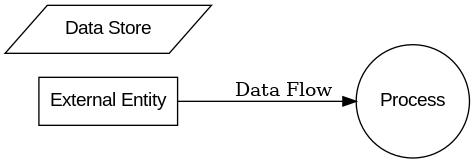
3
What are External Entities also called?
Terminators.
4
What does an External Entity represent?
A person, department, organization, or system that provides or receives data.
5
What is the naming rule for External Entities?
Use the singular form of the name.
6
What is another name for a Process symbol?
Bubble or transform.
7
What does a Process symbol represent?
A function that modifies or changes data from one form to another.
8
What is the naming convention for a Process?
An active verb followed by a singular noun (e.g., "Calculate Pay").
9
What is the maximum number of process symbols in one DFD diagram?
Nine.
10
What does a Data Flow symbol represent?
The transfer of data among data stores, sources/sinks, and processes.
11
What is the naming convention for a Data Flow?
Adjectives + singular noun (e.g., "Customer Order").
12
What is the rule for labeling Data Flows?
All flow lines must be labeled.
13
What does a Data Store represent?
A data repository used to store data for later use by processes.
14
Who can connect directly to Data Stores?
Only processes.
15
What is the naming convention for a Data Store?
Plural name with adjectives and a noun (e.g., "Customer Records").
16
What does a Context Diagram show?
The scope of a system, its boundaries, external entities, and major information flows.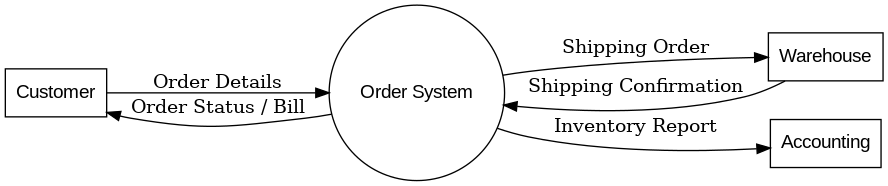
17
How many process symbols are in a Context Diagram?
One (representing the whole system).
18
Does a Context Diagram show Data Stores?
No.
19
What are the steps to develop a Context Diagram?
Identify the process, external entities, and data flows.
20
What are some guidelines for drawing DFDs?
Fit on one page, use unique names, don’t cross lines, give each process a unique name/number, and ensure clarity.
21
What is leveling in DFDs?
Breaking down diagrams into increasing detail.
22
What is balancing in DFDs?
Ensuring input/output flows in parent diagrams match their child diagrams.
23
What are lower-level diagrams also called?
Child diagrams.
24
What does Diagram 0 (Level 0 DFD) show?
An exploded view of Process 0 from the context diagram.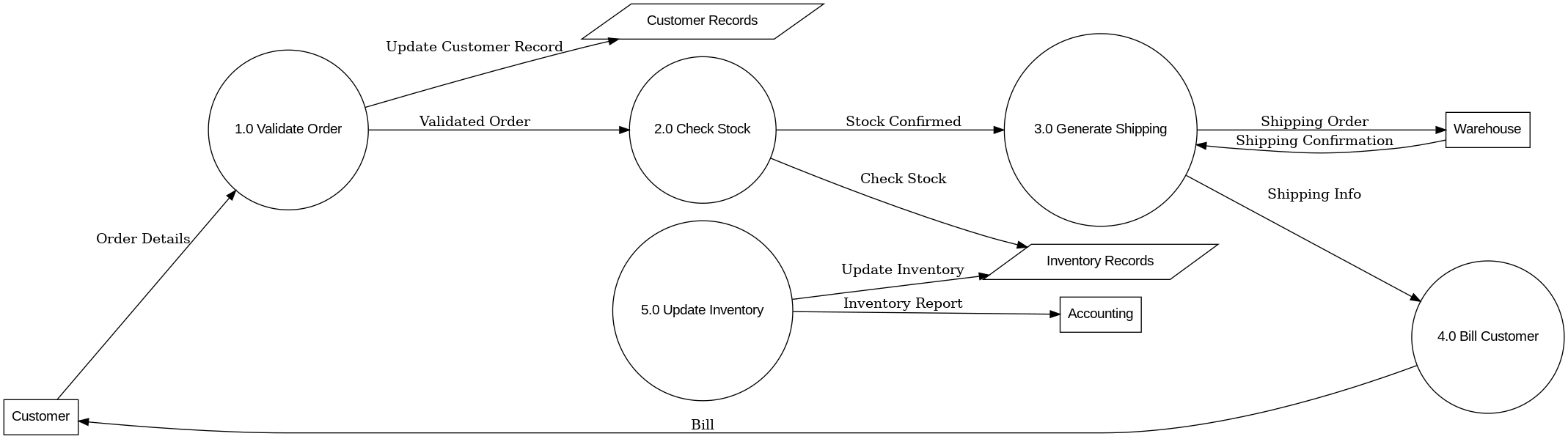
25
What are the steps to draw a Level 0 DFD?
Identify processes, data flows to/from entities, and data stores.
26
What does Diagram 1 (Level 1 DFD) show?
Detailed view of a specific process from a higher-level diagram.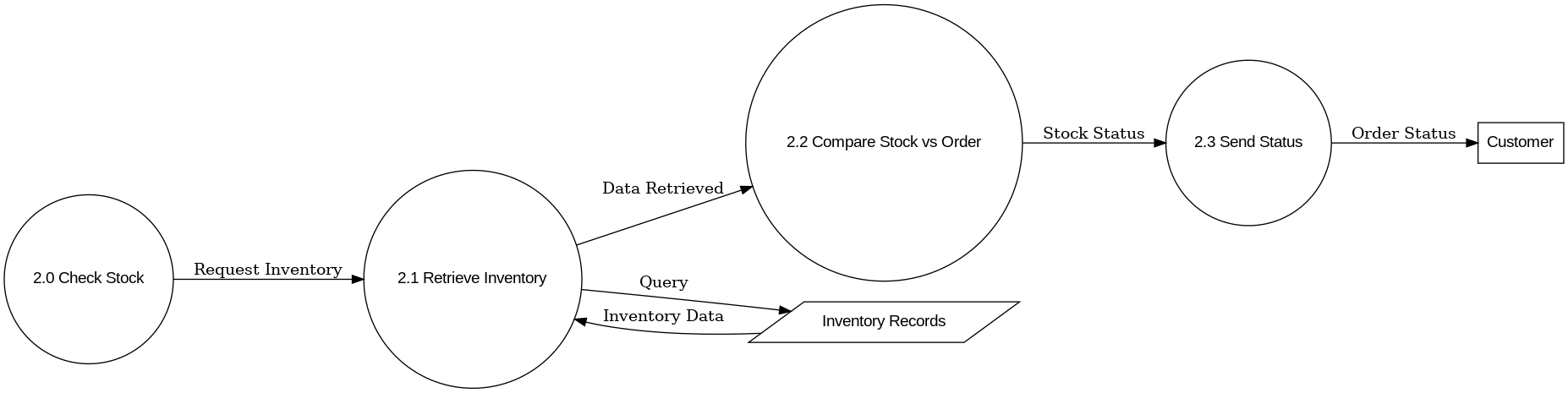
27
What are the three common DFD mistakes called?
Black Hole, Miracle, and Grey Hole.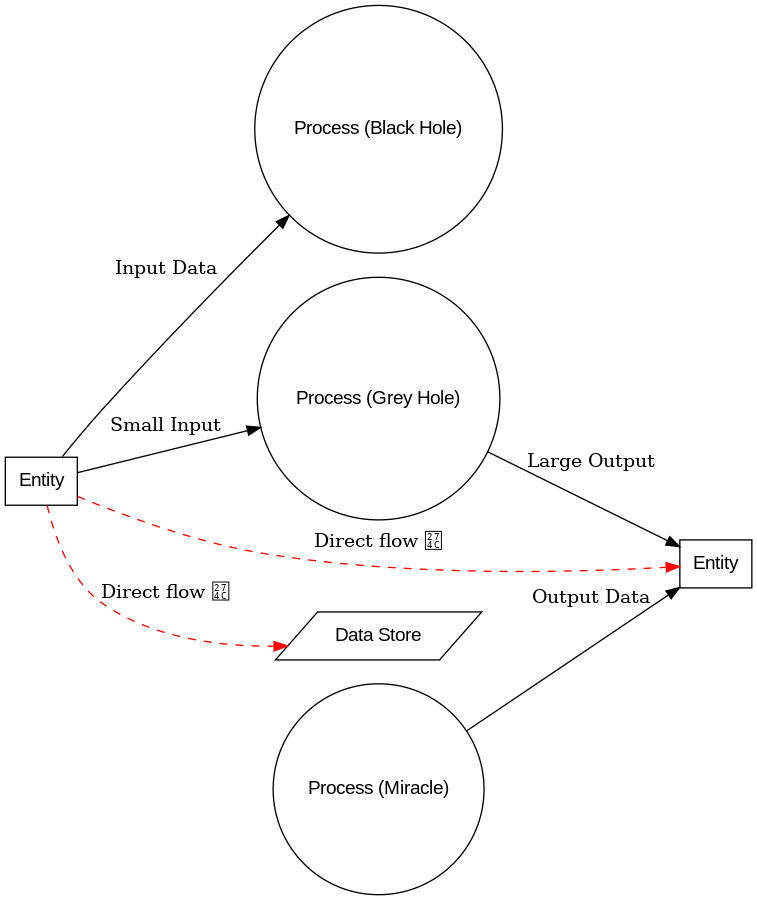
28
What is a Black Hole in DFD?
A process with inputs but no outputs.
29
What is a Miracle in DFD?
A process with outputs but no inputs.
30
What is a Grey Hole in DFD?
A process with outputs larger than what inputs could produce.
31
What is an incorrect data flow between entities/stores?
Data going directly from source to store or source to sink without passing through a process.
Mehr Karteikarten: Informatik
Computers in society:2Informatik · EnglischCalLecture 1 + Lecture 1 (IDK)Informatik · EnglischAmoghCommunications Technology in Information SystemsInformatik · Englisch—Griffith—Bits & Data Representation Study GuideInformatik · EnglischSgDatabaseInformatik · EnglischFaizahSection 10-Computational methods Informatik · EnglischDsoboDeep LearningInformatik · Englisch김정환Week 3 - Data RepresentationInformatik · Englisch—Griffith—Social Media and Competitive AdvantageInformatik · EnglischJoshNetwork Security (NETSEC)Informatik · EnglischEdsonComputer Hardware Basic Study GuideInformatik · EnglischSgCisco Networking and CCNA ConceptsInformatik · EnglischManethel
Lerne diese Decks in der App
Kostenlos auf iPhone, Android, Mac und im Web. Füge jedes Deck mit einem Tipp zu deinem Konto hinzu.